Fashion ecommerce SEO is the work of making a clothing, footwear or accessories store easy for search engines to crawl, understand and rank, in a category where products change every season, each item comes in several sizes and colors, and shoppers choose mostly with their eyes. The general rules of ecommerce SEO still apply. What makes fashion different is that the catalog never sits still.
A store that does well in organic search builds its rankings on pages that last (categories, collections and guides), handles each product URL deliberately when the product goes out of stock or out of the range, and gives Google clean signals about variants, apparel attributes and images.
This guide covers what is specific to fashion, based on Google’s current documentation, read on 13 November 2026. To see where organic search sits among the levers that drive your store’s revenue, take the Revenue Growth Diagnosis.
Why SEO works differently for fashion stores
Four traits separate a fashion catalog from, say, a store selling kitchen equipment or auto parts.
The first is rotation. New collections replace old ones every season, sometimes every few weeks for fast-moving brands. A product page can build rankings and links for a few months and then disappear. Store owners raise this exact doubt in ecommerce forums: if most of the range changes each season, is SEO even worth the effort? The answer depends on where the store builds its rankings, which is the subject of the next section.
The second is variants. A single dress can exist in six sizes and four colors, which is 24 combinations. Handled badly, each combination becomes a near-duplicate URL competing with the others.
The third is the image. Shoppers judge cut, fabric and color from photos, so product images carry much of the selling, and they can also be found on their own through image search. Images are a search asset, not decoration.
The fourth is demand that moves with the calendar and with trends: coats in autumn, swimwear in spring, a named cut or color when it becomes popular. Keyword planning in fashion is partly a calendar exercise.
Everything else, from authority to technical health, follows the same principles as any online store, covered in the ecommerce SEO optimization guide. The rest of this article focuses on the four traits above.
Build on pages that outlive the season
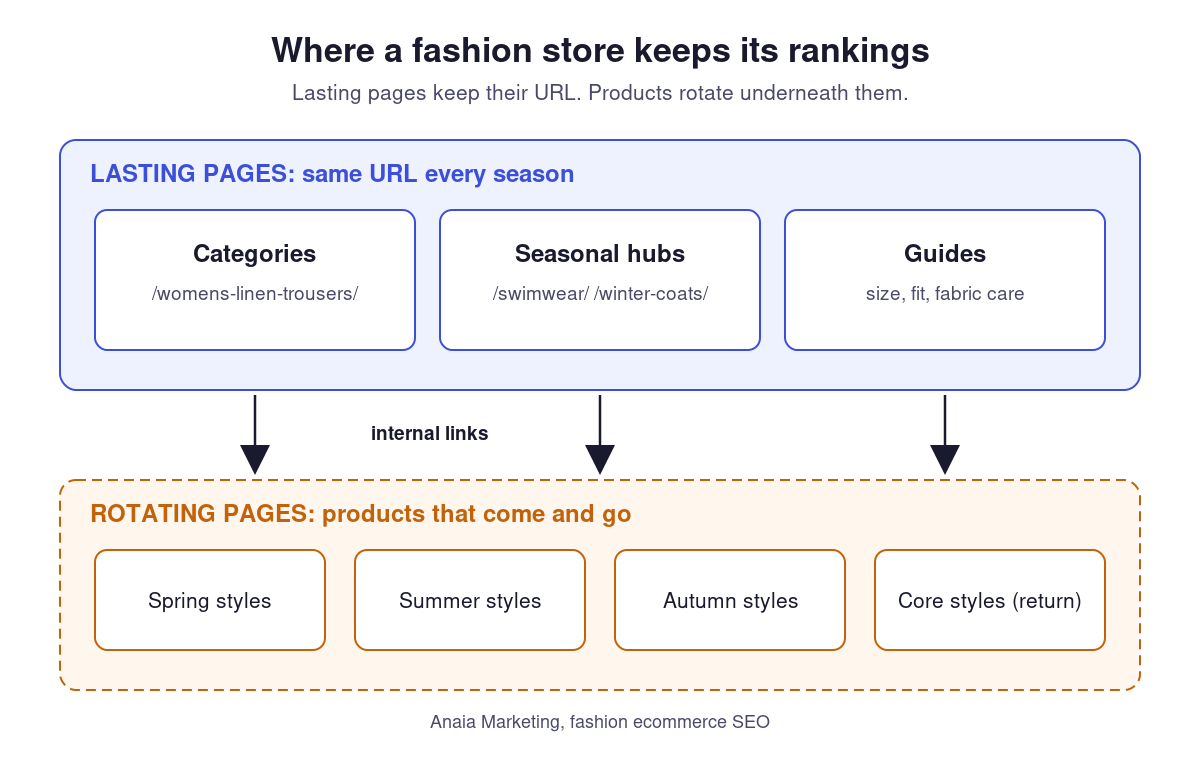
In fashion, the pages most likely to hold rankings over years are not individual products. They are the pages whose purpose stays the same while their content rotates: category pages such as “women’s linen trousers”, collection hubs such as “wedding guest dresses”, and editorial guides such as a size guide or a fabric care page.
This has three practical consequences.
Category names should follow how shoppers search, not internal collection codes. “Spring 2026 drop 3” means something to the merchandising team and nothing to a search engine. “Women’s linen trousers” can rank for years, filled with whichever linen trousers are on sale at the time.
Seasonal landing pages should keep the same URL from one year to the next. A page at /swimwear/ or /winter-coats/ that is refreshed each season accumulates links and history. A new URL with the year in it, created every season, starts from zero each time.
Internal links from the home page, the main navigation and editorial content should point to these lasting pages first. Product pages then benefit from being linked from strong categories, rather than each product having to earn its own visibility before it leaves the range.
This is also the honest answer to the forum question. SEO in fashion pays off when the investment goes into pages that survive the season. A store that only optimizes individual products, and lets each one vanish at the end of the season, keeps restarting from zero.
Decide what happens to a product URL when it leaves the catalog
None of the three top-ranking pages read for this guide explains what to do with a product page when the product sells out, goes off season or is discontinued. Yet this decision is made hundreds of times a year in a fashion store, usually by default rather than by choice. The table below sets out a decision rule based on how Google documents status codes, redirects and product availability.
| Situation | What to do with the URL | Availability in structured data |
|---|---|---|
| Sold out, restock expected | Keep the page live (200), show the status clearly and offer alternatives or a restock alert | OutOfStock, or BackOrder if orders are accepted |
| Seasonal product that returns next year | Keep the same URL live and update it when the product returns, rather than creating a new page | OutOfStock while away, PreOrder if pre-orders open |
| Discontinued, with a direct successor (same item, new colorway or version) | Permanent (301) redirect to the successor | Not applicable once redirected |
| Discontinued, no close equivalent, page still useful (reviews, links, demand for the name) | Keep the page live as an archive with clear “no longer available” messaging and links to similar items | Discontinued |
| Discontinued, no equivalent, no links or traffic | Return 404 or 410 and remove the URL from the sitemap | Not applicable |
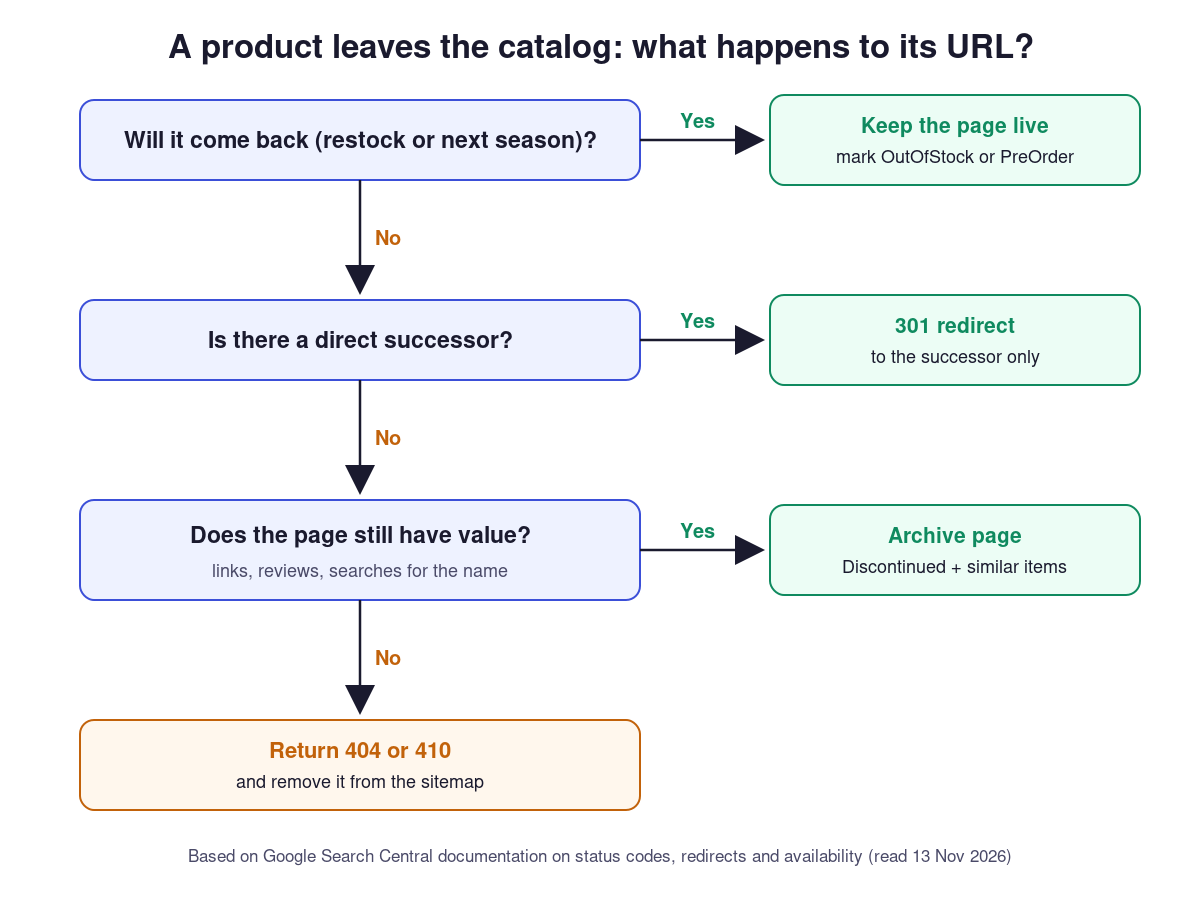
The reasoning behind each row comes from Google’s documentation.
A permanent redirect tells Google to show the redirect target in search results (Google, Redirects and Google Search). That is why it fits a true successor and not a loosely related page. Sending every discontinued dress to the home page or to a generic “dresses” category is a common shortcut, but it sends shoppers somewhere they did not ask to go.
For 404 and 410, Google’s crawlers handle the two codes in the same way: a URL that was indexed is removed from the index, and the crawl frequency of that URL gradually decreases (Google, HTTP status codes, February 2026). Choosing between them is a matter of preference, not of ranking.
For pages that stay live, Google’s merchant listing documentation supports availability values including InStock, OutOfStock, BackOrder, PreOrder and Discontinued (Google, merchant listing structured data, September 2026). Keeping this value accurate matters more in fashion than elsewhere, because availability changes constantly.
A fictional example shows how the rule works in practice. A brand ends its summer season with 120 products leaving the range. Forty are core styles that return each year, so their URLs stay live and are marked out of stock until the next season. Fifteen have direct successors in the new collection and are redirected. Ten have reviews or backlinks and become archive pages. The remaining 55 return 404 and leave the sitemap. Each product is classified once, in a simple spreadsheet, and the outcome is a deliberate choice rather than the platform’s default.
Handle size and color variants without creating duplicates
Variants are the second fashion-specific challenge. Google’s guidance is consistent across its documentation.
Each variant that a shopper can select should be reachable at its own URL, either as a path segment such as /t-shirt/green or as a query parameter such as /t-shirt?color=green (Google, Ecommerce URL structure best practices, December 2025). Opening that URL should show the right image, price and availability, and let the shopper add that exact variant to the cart.
When all variants live on one page (the usual setup, with dropdowns for size and color), there should be a single canonical URL for the whole product group, typically the base URL with no variant preselected (Google, product variant structured data, September 2026). When variants live on separate pages, for example one page per colorway because each has its own photos and demand, each page carries its own complete markup.
A practical rule for fashion: give a color its own page when shoppers search for it by name and the photos differ, for example “black leather ankle boots” versus “tan leather ankle boots”. Keep sizes on the same page, since nobody searches for a size of a specific product, and separate pages per size would only multiply near-identical URLs.
Google also supports ProductGroup markup to describe the relationship. The parent ProductGroup carries a productGroupID and a variesBy property listing what changes between variants (for example size and color), while each variant is a Product with its own unique identifier, such as a SKU or GTIN, nested with hasVariant. Shared information such as brand, material or reviews can sit on the group instead of being repeated on every variant. Google also recommends putting Product structured data in the initial HTML, and notes that markup generated with JavaScript can make Shopping crawls less frequent and less reliable, which matters for fashion, where price and availability change often (Google, product variants).
Give Google the apparel attributes shoppers filter on
Fashion shoppers filter on attributes: size, color, material, fit, gender. Google’s merchant listing structured data has dedicated properties for these, and filling them in describes the product in the same terms shoppers use.
| Attribute | Structured data property | Example value |
|---|---|---|
| Size | size (text, or a SizeSpecification) | “M”, “EU 38” |
| Size system | sizeSystem, inside SizeSpecification | WearableSizeSystemUS, WearableSizeSystemEurope |
| Size group | sizeGroup, inside SizeSpecification (at most two) | WearableSizeGroupPetite, WearableSizeGroupPlus |
| Color | color | “Navy”, “yellow/sky blue” |
| Material | material | “Linen”, “Cotton/Polyester” |
| Pattern | pattern | “Striped” |
| Audience | audience (PeopleAudience) with suggestedGender | Female, Male or Unisex |
Source: Google, merchant listing structured data, September 2026. The same documentation points to the matching attributes in Google Merchant Center, so the product feed and the page markup should use the same values. A dress listed as “navy” in the feed and “dark blue” on the page sends two different descriptions of the same item.
These properties make a product eligible for richer shopping displays. They do not guarantee one, and Google decides what appears in each result.
Beyond markup, the product page itself still has to answer the questions that block a purchase: how the item fits, what the fabric feels like, how to care for it. Writing unique descriptions rather than reusing supplier text is covered in the guide to SEO for ecommerce product pages.
Make product images findable
In fashion, images do much of the selling, and Google’s image documentation lists a few requirements that are easy to miss on visually led store themes (Google, Image SEO best practices, March 2026).
Product images should be real image elements (img with a src attribute), not CSS backgrounds. Google states that it does not index CSS images. Some fashion themes use background images in sliders and lookbooks, which keeps those photos out of image search.
When responsive images use srcset or the picture element, keep a fallback URL in the src attribute, because some crawlers do not read srcset.
File names give Google light clues about what an image shows. “navy-linen-wrap-dress-front.jpg” says more than “IMG00023.jpg”. Alt text should describe the photo for someone who cannot see it, such as “Navy linen wrap dress, front view, knee length”, not a list of keywords repeated on every image. Google also extracts meaning from text near the image, which is one more reason to keep a real description on the product page.
Large photo libraries hosted on a content delivery network can be listed in an image sitemap, which Google allows even when the images sit on another domain.
Control filters and pagination on large collections
Fashion collections are often long and heavily filtered: size, color, price, fabric, occasion. Two rules from Google’s pagination guidance are worth checking against what many fashion SEO guides still recommend (Google, pagination and incremental page loading, December 2025).
Give each page of a paginated collection its own URL (for example ?page=2) and its own canonical. Google advises against using the first page of the sequence as the canonical for the others. Some guides still recommend setting page 2 and beyond to “noindex”; that advice is not part of Google’s current guidance, which focuses on linking the pages to each other with standard links.
Make sure products loaded with a “load more” button or infinite scroll can also be reached through plain links. Google’s crawlers do not click buttons and generally do not trigger JavaScript that waits for user actions, so products that only appear after a click or a scroll may never be found.
Filter and sort URLs (?size=m, ?color=navy, ?sort=price) should generally not be indexed. The exception is a filter that matches real search demand, such as a “linen” filter inside dresses. In that case, the better option is usually a dedicated category page with its own copy and a stable URL, rather than an indexed filter.
Plan keywords and content around the fashion calendar
Fashion demand follows the calendar and trends, and both can be planned.
Seasonal terms such as “linen trousers”, “wedding guest dresses” or “winter coats” come back every year. The pages that target them should be updated and internally linked a few weeks before demand rises, not on the day the collection launches, because Google needs time to recrawl updated pages.
Trend terms (a named cut, color or style) rise and fall faster. A trend can justify a collection page if it matches enough products and is likely to last more than a season. Otherwise, an editorial article that links to the relevant products is a lighter way to capture the interest without creating a page that will be empty in six months.
Long-tail product terms, combining item, material and color, are where small and mid-sized brands can compete with large retailers, because they match a specific intent. Finding and grouping these terms is covered in the guide to ecommerce keyword research.
Editorial content works best in fashion when it answers a pre-purchase question: a size and fit guide, a fabric guide, how to style a piece. These pages tend to stay relevant across seasons, earn links naturally and send internal links to lasting category pages. They also give a brand’s own expertise somewhere to show, which a product grid cannot do. Planning this kind of content around buying questions is the subject of the ecommerce content strategy guide.
Where fashion SEO pays off
A fashion store does not win in search by optimizing each product as if it would stay on sale forever. It wins by putting its effort into pages that outlive the season, by handling each departing product URL with a deliberate rule instead of the platform’s default, and by describing variants, apparel attributes and images in the terms Google documents.
The table in this guide can be applied at the end of the next season, and the attribute list can be checked against the product feed in an afternoon. For brands that want support across the whole program, Anaia’s ecommerce SEO services cover SEO, AEO and GEO for DTC brands. To see how organic search compares with the other growth levers in your store, take the Revenue Growth Diagnosis.
FAQ
Q1. Is SEO worth it for a fashion brand if products change every season?
Yes, when the effort goes into pages that keep their URL across seasons: categories, collection hubs and editorial guides. Individual products still benefit, but they mostly rank through the strength of the categories that link to them. A brand that only works on product pages, and lets them disappear each season, loses most of what it builds.
Q2. Should out-of-stock fashion products be removed from the site?
Not automatically. A product that will be restocked or that returns next season should keep its page, with an accurate out-of-stock status. Removal (a 404 or 410 response) fits products that are discontinued, have no close successor and no remaining links, reviews or search demand.
Q3. Does each color of a product need its own page?
Only when shoppers search for that color by name and the photos differ. In that case, separate pages per colorway can each rank for their own searches. Sizes should stay on the same page, and every selectable variant should still be reachable at its own URL, as Google recommends.
Q4. Does a fashion store need a blog to rank?
Not a blog in the sense of news posts. What helps is editorial content that answers questions shoppers ask before buying, such as fit, fabric and styling, and that links to category pages. A small number of useful guides tends to do more than a high volume of trend posts.
Q5. Do the same practices help with AI search results?
Partly. Google states that no special optimization is required to appear in its AI features, beyond the fundamentals of being crawlable and providing helpful content. Clear product information, accurate structured data and guides that answer real questions serve both classic results and AI answers, without guaranteeing a citation in either.

Passionate about the future of search, co-founder of Anaia Marketing and an SEO strategist focused on helping brands grow through search, strategic content, and AI-driven visibility. Her work sits at the intersection of technical SEO, content systems, and emerging AI search optimization, with a focus on building sustainable organic growth.