The best ecommerce SEO tools depend on the job you need done, not on a single winner. Most stores should start with the free tools from Google, add one paid data tool when keyword research becomes the bottleneck, and only then pay for scale or AI visibility tracking.
This guide covers 12 tools grouped by job, shows list prices checked on official pages on 9 November 2026, and gives you a break-even formula to judge whether a paid subscription will pay for itself in orders.
How this list was built, and what it is not
Anaia did not run a controlled test of these tools, so there is no score and no “number one” here. The tools are grouped by the job they do for a store: see what Google sees, crawl the catalog, research keywords, optimize content and watch behavior. Prices for Ahrefs, Semrush and Screaming Frog come from each vendor’s own pricing page, read on 9 November 2026. For the other tools the article gives no price, because the sources we read are either dated or disagree.
An ecommerce store has needs that a blog does not: thousands of product and category pages, product structured data, filtered URLs and out-of-stock pages. That is why the jobs below are split the way they are. Our guide to ecommerce SEO optimization explains the strategy these tools support.
The 12 ecommerce SEO tools at a glance
| # | Tool | Main job | Cost | Main limit |
|---|---|---|---|---|
| 1 | Google Search Console | See indexing, queries and clicks | Free | Your own site only, no competitor data |
| 2 | Google Merchant Center | Check product feed health | Free | Useful only if you list products with Google |
| 3 | PageSpeed Insights | Measure speed on product and category pages | Free | One URL at a time |
| 4 | Screaming Frog SEO Spider | Crawl the whole catalog | Free to 500 URLs, £199 per year | Desktop app, no keyword data |
| 5 | Ahrefs | Keyword, competitor and backlink data | Free tier, $29 to $449 per month | Key features sit on higher plans |
| 6 | Semrush | Research across SEO, content and ads | $139 to $299 per month (SEO and AI plans) | Cost rises with projects and users |
| 7 | SE Ranking | Rank tracking and audits | Check vendor page | Smaller data set than the two leaders, per reviewers |
| 8 | Surfer | Score content against ranking pages | Check vendor page | Not built for product templates |
| 9 | Clearscope | Optimize copy for search intent | Check vendor page | Content only, no technical audit |
| 10 | Yoast SEO or All in One SEO | On-page controls inside WordPress | Free and paid versions | WordPress and WooCommerce only |
| 11 | Shopify SEO apps | On-page edits inside Shopify | Varies by app | Page-level, not a crawler |
| 12 | Microsoft Clarity | See why organic visitors do not buy | Free | Behavior data, not SEO data |
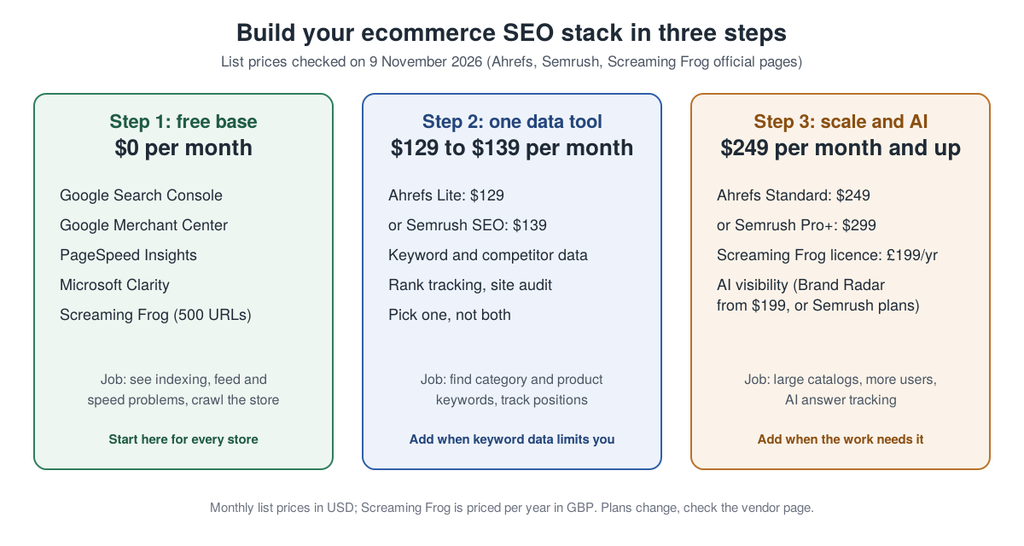
The infographic repeats the logic of the table: free first, one data tool second, scale third. The sections below explain each tool and when to add it.
Free tools from Google: the base of every stack
1. Google Search Console
Google Search Console is the one tool every store should connect first, because it shows what Google actually indexes and what people searched before clicking. Google says it reports how its search engine crawls, indexes and serves your site, and recommends checking it about once a month or after content changes (Google Search Central). Use the performance report to find category and product queries with impressions but few clicks, and the indexing report to find product pages Google skipped.
2. Google Merchant Center
Merchant Center is where product feeds are checked before products appear in Google’s shopping surfaces. Agency Intergrowth treats it as the first tool to open when an ecommerce client’s products are not showing up, because it flags disapproved listings and mismatches between the feed and the site (Intergrowth). It also pairs with the product markup on your pages. Google distinguishes product snippets from merchant listings in its Product structured data documentation, and merchant listings are the type for pages where shoppers can buy directly.
3. PageSpeed Insights
PageSpeed Insights scores a single URL on mobile and desktop and lists what slows it down. Run it on a product page and a category page, not only the homepage, because those templates carry the sales. Fix a template once and every page that uses it improves.
Crawling and data tools: find problems and keywords
4. Screaming Frog SEO Spider
Screaming Frog crawls a store the way a search engine does and reports broken links, redirect chains, duplicate titles and missing metadata. The free version crawls up to 500 URLs, and a licence is £199 per year for unlimited crawling, limited only by your machine’s memory (Screaming Frog). For a catalog with filters and variants, a crawl is the fastest way to see how many URLs your platform really generates.
5. Ahrefs
Ahrefs is a research suite known for backlink data, plus keyword research, site audit and rank tracking. Its pricing page lists a free tier, Starter at $29, Lite at $129, Standard at $249 and Advanced at $449 per month. The Standard plan adds keyword clusters and search intents, which help when you map keywords to category pages. Brand Radar, its AI visibility product, starts at $199 per month on top (Ahrefs).
6. Semrush
Semrush covers keyword research, competitor analysis, site audit and position tracking in one login. On its pricing page the SEO plan is listed at $139 per month ($117.33 per month billed annually), Starter at $199 and Pro+ at $299, with AI visibility tracking built into those plans (Semrush). Pro+ adds content optimization and keyword cannibalization analysis. Pick Ahrefs or Semrush, not both, until a specific gap proves you need the second.
7. SE Ranking
SE Ranking is a smaller all-in-one suite with rank tracking and site audits, often described as a cheaper alternative to the two leaders. Anaia did not verify its current pricing, so check the vendor page. It is worth testing if the two leaders cost more than your budget allows.
Content and on-site tools: improve the pages that sell
8. Surfer
Surfer compares a draft with pages that rank for a query and suggests terms and structure. It fits buying guides and long category copy. It does not help with product templates or technical problems, and following its scores blindly can push copy toward filler. Our guide to SEO for ecommerce product pages shows what product pages need beyond term lists.
9. Clearscope
Clearscope works on the same job: it shows the semantic term groups a page needs to satisfy the search intent behind a keyword. Intergrowth says it runs every article through the tool and finds it most useful on human-written content (Intergrowth). Choose Surfer or Clearscope, not both.
10. Yoast SEO or All in One SEO (WordPress and WooCommerce)
On a WordPress store, an on-page plugin manages titles, meta descriptions, redirects and XML sitemaps from the admin. Intergrowth installs Yoast on every WordPress site it manages and says the free version covers most of what a WooCommerce store needs. All in One SEO also offers WooCommerce-specific features. Both only fit WordPress.
11. Shopify SEO apps
Apps such as Plug in SEO, SEOAnt and Yoast SEO for Shopify handle page-level edits inside the Shopify admin: titles, descriptions, alt text and structured data. They do not crawl your whole store or show competitor data, so they pair with Search Console and a crawler. Check each app’s current pricing and its Shopify App Store reviews before installing.
12. Microsoft Clarity
Microsoft Clarity records heatmaps, scroll maps and session replays for free. It matters for SEO because rankings do not pay if organic visitors leave without buying. When traffic is up and sales are flat, watch recordings of organic sessions on category and product pages, then take the findings to your ecommerce conversion rate optimization plan.
What to check before you pay for a tool
Five questions separate a tool that helps a store from a subscription nobody opens.
- Catalog limits. Crawl and keyword limits are often per plan. A store with filters can generate far more URLs than it has products, so check the limit on the plan you are pricing, not the top plan.
- Who does the work. Every tool above except the app and plugin layer reports problems. Someone must change templates, titles and copy. If nobody has the hours, a tool will not fix that, and the on-site basics in our guide to ecommerce SEO optimization come first.
- Platform fit. Yoast and All in One SEO are for WordPress, the Shopify apps are for Shopify. The data tools work on any site.
- AI visibility. If you want to track mentions in AI answers, check whether it is included or an add-on. Semrush lists AI visibility inside its plans, and Ahrefs sells Brand Radar separately from $199 per month.
- Billing and cancellation. Compare monthly and annual prices, and read the cancellation steps before a trial ends. Semrush shows both prices on its page, for example $139 monthly or $117.33 per month billed annually for its SEO plan.
How to know if a paid tool will pay for itself
No page in the top results shows how to judge a subscription in orders. Use this formula and your own numbers:
Break-even orders per month = tool cost per month ÷ gross profit per order
Here is a fictional store, not a client case. Its average order value is $70 and its gross margin is 40%, so each order earns $28 of gross profit. The orders needed to cover each tool’s list price at monthly billing are:
| Tool and plan | Monthly list price | Extra orders needed | Extra sessions at 2% conversion |
|---|---|---|---|
| Ahrefs Lite | $129 | 5 | 250 |
| Semrush SEO | $139 | 5 | 250 |
| Ahrefs Standard | $249 | 9 | 450 |
| Semrush Pro+ | $299 | 11 | 550 |
| Ahrefs Advanced | $449 | 17 | 850 |
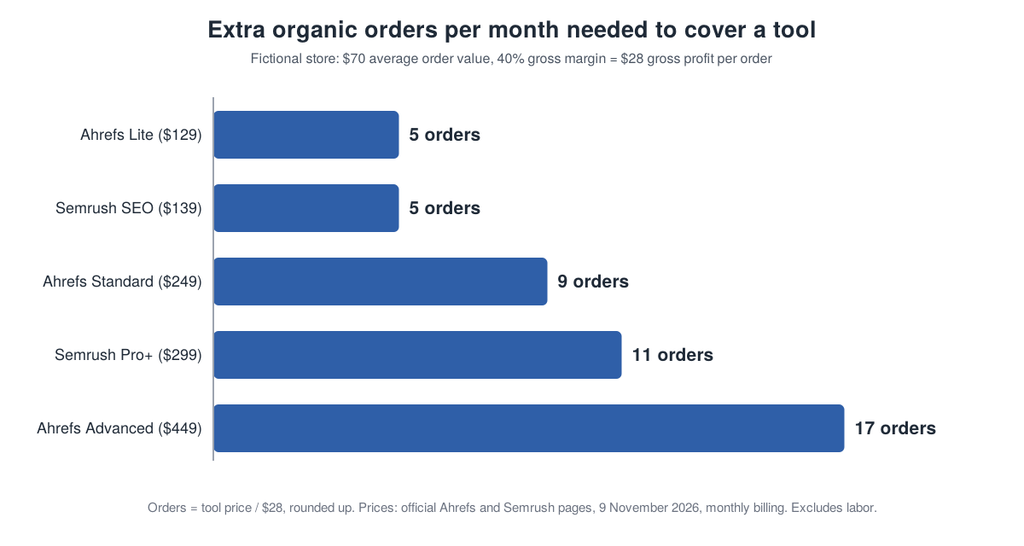
The calculation hides the biggest cost: time. If someone spends 5 hours a month acting on the tool’s data at $50 per hour, the Ahrefs Standard plan costs $249 plus $250 of labor, or $499. That needs 18 extra orders per month, or 900 sessions at 2% conversion. Orders also come from the work the tool guides, not from the tool itself, so treat the result as a minimum bar for the work, not a forecast.
Pick the cheapest plan that removes your current bottleneck. If you have not outgrown Search Console and a free crawl, a paid tool is a cost without a job.
How this compares with the top-ranking guides
On 9 November 2026, the top three Google results for this query were a 14-tool ranking from an AI marketing vendor that places its own product first and discloses it, a 15-tool list from a WordPress plugin maker dated May 2025, and a 16-tool stack from an agency, updated October 2026. The vendor ranking uses editorial scores that readers cannot reproduce, the plugin list carries prices that are more than 17 months old, and the agency list gives no prices.
None of the three shows how to decide whether a subscription pays back, and none says where to stop buying. This guide adds that formula, dated prices from vendor pages, and a free-first order.
Choose tools by job, then keep what earns its cost
Start with the free base: Search Console, Merchant Center, PageSpeed Insights, Clarity and a free crawl. Add one data tool when keyword research limits your growth, then add scale or AI visibility tracking only when the work needs it. Calculate the break-even orders before every paid subscription, and cancel what nobody opens.
If you want an expert view of which pages and tools will move organic revenue first, get your Revenue Growth Diagnosis and see where your funnel leaks before you buy another subscription. For stores that want SEO, answer-engine and generative-engine work handled together, Anaia’s ecommerce SEO services cover that end to end.
Frequently asked questions
Q1. What are the best ecommerce SEO tools?
Google Search Console, Google Merchant Center, PageSpeed Insights and a crawler such as Screaming Frog make the best free base. For paid data, Ahrefs and Semrush are the two research suites listed most often. The right choice depends on whether you need keyword data, crawling, content optimization or on-page edits.
Q2. Are there free ecommerce SEO tools?
Yes. Search Console, Merchant Center, PageSpeed Insights and Microsoft Clarity are free, Screaming Frog is free up to 500 URLs, and Ahrefs offers a free tier. Together they cover indexing, product feeds, speed, crawling and behavior for a small store.
Q3. How much do ecommerce SEO tools cost?
On 9 November 2026, Ahrefs listed plans from $29 to $449 per month and Semrush listed its SEO plan at $139 per month. Screaming Frog costs £199 per year for the paid licence. Prices change, so check each vendor page and compare monthly and annual billing.
Q4. Do I need Ahrefs and Semrush together?
Usually not. Both cover keyword research, competitor analysis and site audits. Pick one, and add the second only if a specific data gap blocks your work.
Q5. What is the best SEO tool for Shopify?
There is no verified single answer. Pair Search Console and a crawler with one Shopify app for page-level edits, then add a data tool when keyword research limits you. Check each app’s current pricing and reviews before installing.
Q6. Do SEO tools track visibility in AI answers?
Some do. Semrush lists AI visibility tracking inside its plans, and Ahrefs sells Brand Radar from $199 per month. Treat these as observations from a fixed set of prompts, not a guarantee of citations.

Passionate about the future of search, co-founder of Anaia Marketing and an SEO strategist focused on helping brands grow through search, strategic content, and AI-driven visibility. Her work sits at the intersection of technical SEO, content systems, and emerging AI search optimization, with a focus on building sustainable organic growth.