

An ecommerce content strategy is a plan that decides which content your store publishes, for which shopper question, on which page type, and how you will know it produced revenue. The plan matters more than the volume of content. Stores that publish without it end up with blog posts that attract visits and never reach a product.
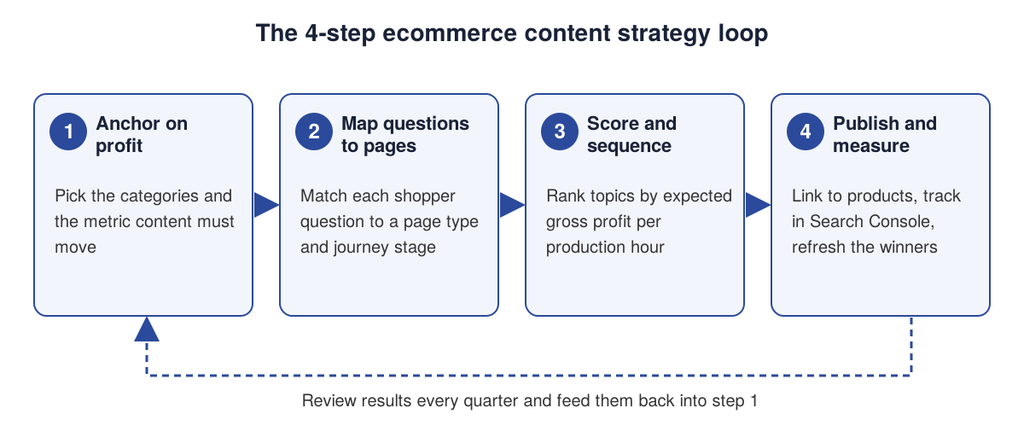
This guide gives you four steps: anchor on profit, map shopper questions to pages, score topics by expected gross profit per production hour, then publish and measure. It includes a fictional worked example, so you can see why a low-volume comparison page can outrank a popular definition post in your plan.
If you want to know where your store loses revenue before you plan content, run the Revenue Growth Diagnosis and get a prioritized view of your growth gaps.
What an ecommerce content strategy includes
A content strategy answers four practical questions. Who is the content for, what do they need to know before they buy, where will they find it, and what should happen after they read it. iPullRank frames the same thinking as six questions about who your customers are, what they fear and want, how and where they consume content, what they expect, and what results you expect (iPullRank, content strategy for ecommerce).
Content strategy is not the same as content marketing. Marketing is the act of producing and distributing content. Strategy is the decision about what to produce first and why. A store can publish three posts a week and still have no strategy if nobody can say which post is supposed to sell which category.
It also differs from a general ecommerce marketing plan. Paid ads, email and social all use content, but this guide focuses on the content your store owns: category pages, product pages, buying guides, comparisons, support articles and the blog. These assets earn organic traffic and keep working after the budget stops. For the wider plan that connects channels, see our guide to ecommerce marketing strategy.
Step 1: anchor the strategy on profit, not traffic
Start with the business result, then work backward to content. Pick the two or three product categories where growth would change the business the most, and write down the one metric that content has to move for each of them.
Three questions make the choice concrete.
First, which categories carry the best gross margin and the highest average order value? Content for a low-margin category needs a much higher order count to pay for itself. Second, where does demand already exist but you lose it? Open the Performance report in Google Search Console and look at queries and pages that already earn impressions without clicks or orders (Google Search Console Help, Performance report). Third, which stage of the journey is weakest: discovery, comparison or reassurance after the first visit?
Write the answers as a short statement. For example: “Grow orders in the grinder category, where gross profit per order is highest, by capturing comparison searches.” That sentence will filter hundreds of possible topics in the next steps.
Google’s guidance supports this discipline. Its ranking systems favor content created for people, and it lists writing about topics only because they seem trending, or producing lots of content on many topics hoping some will perform, as warning signs of search engine-first content (Google Search Central, helpful content). A strategy anchored on your own categories keeps you out of that pattern.
Step 2: map shopper questions to page types
Shoppers do not search for your blog. They search for answers at different moments, and each moment calls for a different page. The top-ranking guides for this topic describe the same idea in different words. Amasty separates shoppers who are still learning, those who need convincing and those who already know what they want (Amasty, ecommerce content strategy). iPullRank maps content to the top, middle and bottom of the funnel (iPullRank).
The step that most guides skip is the one that matters for revenue: deciding the page type before writing. Use the table below as a working map.
| Shopper question | Journey stage | Best page type | Example |
|---|---|---|---|
| What is this, and do I need it? | Discover | Educational article | “What is a burr grinder?” |
| Which one should I choose? | Compare | Buying guide or comparison page | “Burr vs blade grinder” |
| Which product fits my case? | Decide | Category page or product page | “Burr grinders for espresso” |
| How do I use or fix it? | After purchase | Support article, email | “How to descale an espresso machine” |
| What can I buy next? | Return | Collection, replenishment email | “Descaler and filter kits” |
Gather the questions from sources you already own before reaching for a tool. Search Console queries show the exact words shoppers use. Customer support tickets, pre-sale chat logs, product reviews and returns reasons show what blocks a purchase. The Medium guide in the top results makes the same point about listening to your audience, though its advice comes from one author’s experience and includes no data you can verify (Medium, Jonathan Howard).
Which ecommerce SEO content to publish first
Ecommerce SEO content is the subset of your content that is meant to earn organic traffic: category descriptions and guides, buying guides, comparisons and support answers. Publish in this order when the catalog is new to content:
- Category pages and their supporting guides, because they target commercial searches closest to a purchase.
- Comparison and buying guides for your best margin products.
- Support and how-to content that serves existing customers and reduces returns.
- Definition and trend articles, only after the above exist.
Product page copy follows the same logic and has its own method, covered in our guide to SEO for ecommerce product pages. For the technical and on-page foundation behind all of it, see ecommerce SEO optimization.
Step 3: score topics and sequence the work
Once you have a list of 20 to 50 candidate topics, you need a reason to publish one before another. A simple, reproducible score does the job: expected gross profit per production hour.
The formula has five inputs:
Monthly searches × expected visit share × visit-to-order rate × gross profit per order ÷ production hours.
Monthly searches come from your keyword tool or Search Console. Visit share is the portion of those searches you expect to capture, which depends on your position. Visit-to-order rate is the share of visitors who buy, and it is lower for educational pages than for comparisons. Gross profit per order is revenue minus product cost. Production hours is what the page costs to research, write, design and publish.
Every input except the production hours is an estimate, and you should replace the assumptions below with your own Search Console and analytics data. The purpose of the score is to rank topics against each other, not to forecast revenue.
A worked example with a fictional store
The example below is fictional. The store sells espresso equipment and the numbers are assumptions chosen to show how the ranking can differ from a ranking by search volume.
| Topic (page type) | Monthly searches | Visit share | Order rate | Gross profit per order | Hours |
|---|---|---|---|---|---|
| Best espresso machine under $500 (buying guide) | 2,400 | 8% | 2.5% | $60 | 14 |
| How to descale an espresso machine (support) | 5,400 | 10% | 0.8% | $24 | 5 |
| What is espresso (definition) | 22,000 | 3% | 0.1% | $28 | 6 |
| Burr vs blade grinder (comparison) | 1,300 | 12% | 3.0% | $35 | 6 |
| Coffee gift guide (seasonal) | 3,600 | 5% | 1.5% | $30 | 8 |
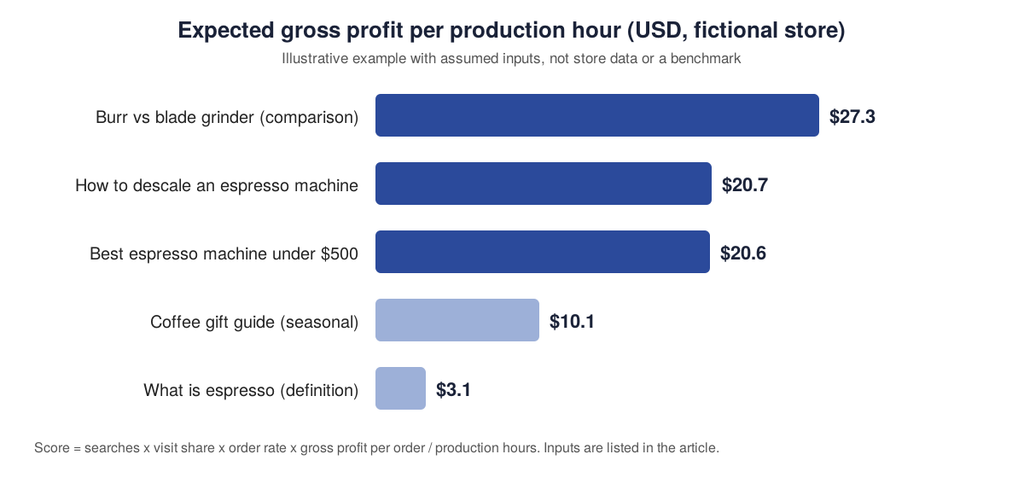
The definition post has 22,000 monthly searches, more than the other four topics combined, yet it ranks last at about $3 of expected gross profit per hour. The grinder comparison has the lowest search volume at 1,300 and ranks first at about $27. Under these assumptions, the descaling guide and the buying guide are nearly tied at about $21 per hour, so you would pick between them on other grounds, such as which one supports a category you want to grow.
The result is a sequence, not a verdict. A definition post can still be worth writing if it feeds internal links to higher-scoring pages or answers a question your support team hears daily. The score tells you what to do first when time is limited.
Rank topics before writing, and re-run the score each quarter when real data replaces the assumptions.
Step 4: publish, link and measure
Publishing is where most strategies lose their value. A guide that does not lead to a product or a category is a dead end for the shopper and a missed signal for search engines.
Before each page goes live, check four things. The page answers the question in its first paragraph. It links to the relevant category and product pages with descriptive anchor text. It carries the proof a shopper needs, such as specifications, sizing, reviews or return terms. And it has one clear next action that fits the stage of the journey.
Length should follow the question, not a target. Google states plainly that it has no preferred word count, and it lists writing to a particular word count as a sign of search engine-first content (Google Search Central). Write until the question is fully answered, then stop.
Content quality also depends on what you add. Google asks whether content provides original information, analysis or substantial value compared with other pages in the results. In ecommerce, the originals are usually first-hand: your own product tests, fit data, customer questions and photos. Mass-producing summaries of what competitors already say, whether by hand or with automation, is the pattern Google’s guidance warns about.
Measure what content did, not only what it earned in traffic
Track content on three levels. At page level, use the Search Console Performance report to follow impressions, clicks, click-through rate and average position for the queries each page targets. At store level, track revenue per session and conversion rate from organic landing pages in your analytics tool, with consistent definitions. At category level, compare orders and gross profit before and after the guide cluster went live, remembering that a before and after comparison shows correlation, not proof of cause.
For help turning that traffic into orders, the next lever is on-site conversion, covered in our guide to ecommerce conversion rate optimization. For the customers who already bought, retention content such as care guides and replenishment emails is covered in ecommerce customer retention.
Refresh before you create
Review published content every quarter. Update a page when its information is outdated, when its query now earns impressions but few clicks, or when a better answer has appeared in the results. Change a page’s date only when the content changed in a substantial way, since Google lists changing dates to appear fresh as a warning sign.
How this compares with other ecommerce content strategy guides
The three guides at the top of Google’s results for this topic on 6 November 2026 are useful starting points. Amasty’s guide covers audience research, buying guides and measurement, and was last updated in January 2026. iPullRank’s guide offers a strong buyer versus audience persona distinction and funnel mapping, but it dates from 2021 and its statistics should be rechecked before you reuse them. The Medium article is a first-person account that discloses editing with an AI assistant and does not include verifiable data.
None of the three gives a method for choosing between topics or ties content back to category profit. That is the gap the scoring step above fills.
Turn the framework into a content plan
An ecommerce content strategy works when every page has a job. Anchor the plan on the categories that carry margin, map each shopper question to the right page type, score topics by expected gross profit per production hour, and measure at page, store and category level. The fictional example shows the main lesson: the topics with the most searches are not always the ones that pay for the time they take.
Start small. Choose one category, list 20 questions from Search Console, support tickets and reviews, score them, and publish the top three before planning the next batch. If you want a second opinion on where content should go first, get your Revenue Growth Diagnosis and see which part of your funnel to fix before you publish more. For stores that want SEO, answer-engine and generative-engine content handled end to end, Anaia’s ecommerce SEO services cover that work.
Frequently asked questions
Q1. What is an ecommerce content strategy?
It is a documented plan for which content a store publishes, for which shopper question and page type, and how results are measured against revenue. It connects categories, products and customer questions to specific pages instead of publishing topics at random.
Q2. How many posts should an ecommerce store publish each week?
There is no verified ideal number. Consistency that your team can sustain matters more than frequency, and Google says it has no preferred word count. Start with the number of high-scoring topics you can finish well in a month, then adjust using results.
Q3. Should an ecommerce store start with a blog or with category pages?
Start with category pages and the guides that support them. They target searches closest to a purchase. Add comparison and support content next, and publish educational articles once the commercial pages are in place.
Q4. How do I measure ecommerce content performance?
Use Search Console for impressions, clicks and average position per page, then your analytics tool for revenue per session and conversion rate from organic landing pages. Compare category orders before and after publishing, and treat the result as correlation unless you run a controlled test.
Q5. Can AI write my ecommerce content?
AI can help with outlines and first drafts, but Google warns against using extensive automation to produce content on many topics and against content that mainly summarizes others. Add what only your store has: product tests, customer questions, specifications and photos, and have an expert review the page.
Q6. How often should I update ecommerce content?
Review it every quarter. Update pages whose facts changed or whose queries earn impressions without clicks. Change the displayed date only after a substantial edit.

Passionate about the future of search, co-founder of Anaia Marketing and an SEO strategist focused on helping brands grow through search, strategic content, and AI-driven visibility. Her work sits at the intersection of technical SEO, content systems, and emerging AI search optimization, with a focus on building sustainable organic growth.