

Ecommerce keyword research is the process of finding the search terms shoppers use to look for products, then deciding which page on your store should target each one. The useful version of the work does not stop at a list of terms with high volume. It ends with a decision for every keyword: which page, which intent and how much revenue it can realistically bring.
This guide covers seven steps, includes a fictional worked example that shows why a keyword with a fifth of the volume can earn more, and explains how to check Google’s results page before committing to a page type.
Stores that want to know how much organic revenue their current keywords leave on the table can run the Revenue Growth Diagnosis and get a prioritized view of where growth is leaking and how to fix it.
What ecommerce keyword research covers
A keyword is a word or phrase people type into a search engine. Ecommerce keyword research has one goal that most other keyword work does not: connecting a query to a specific product, category or buying guide that can turn the visit into an order. Semrush defines it as identifying and analyzing relevant search terms for an online store so that product pages can be created or updated to rank for them (Semrush, ecommerce keyword research).
Three differences set it apart from general keyword research. Intent leans commercial, because shoppers searching close to a purchase matter more than casual readers. The catalog creates scale, since categories, sizes, colors and use cases can multiply into thousands of possible phrases, which makes prioritizing essential. And seasonality hits harder, because a keyword that matters in November may be flat in February (Backlinko, ecommerce keyword tool).
The ecommerce SEO keywords worth looking for
Not every keyword deserves a page. Sorting terms into types makes the later mapping step much faster. Shopify groups ecommerce keywords into four categories, and the table below adds the page type each one usually belongs on (Shopify, keyword research for ecommerce).
| Keyword type | Example (fictional office furniture store) | Usual page |
|---|---|---|
| Product | “mesh ergonomic office chair with headrest” | Product page |
| Category | “ergonomic office chairs” | Category page |
| Problem or solution | “office chair for lower back pain” | Category page or buying guide |
| Brand | “[store name] standing desk” | Home page, category or product page |
Informational terms such as “how to adjust an office chair” form a fifth group. They rarely bring buyers directly, but they can support a help center or a guide that links to products. Both Semrush and Backlinko advise focusing first on commercial and transactional terms, those used by people who are buying or close to it, and treating informational terms as secondary.
Step 1: Build a seed list from the catalog and customer language
Seed keywords are the broad terms that describe what the store sells, such as “office chair” or “standing desk”. Start from the catalog: product types, features, materials, use cases and the problems each product solves. Then check the list against how customers actually talk.
Customer language is the most underused source. Product reviews, questions and answers, support tickets, live chat transcripts and sales calls contain phrases that keyword tools often miss. Shopify’s guide gives the example of repeated review mentions such as “fits well for wide feet” as a signal worth targeting (Shopify). A practical way to run this step is to export three months of reviews and support messages, highlight any product description a customer repeats, and add those phrases to the seed list.
Step 2: Expand the list with tools, Google and your own data
Expansion turns 20 seed terms into a few hundred candidates. Use three kinds of sources, because each one catches different phrases.
Keyword tools give volume and difficulty estimates. Google Keyword Planner, which Semrush calls free, needs a Google Ads account with billing details completed, and Google describes it as a tool for researching keywords for Search campaigns, with monthly search estimates and cost data (Google Ads Help, Keyword Planner). Paid tools such as Semrush add intent labels and a personalized difficulty score; Semrush suggests looking for a personal keyword difficulty under 50% for newer sites, which is a vendor rule of thumb, not a guarantee (Semrush).
Google’s own results are the second source. Type each seed into Google, then record the autocomplete suggestions, the “People also ask” questions and the “People also search for” block at the bottom. All three show real phrasing for free. Backlinko also suggests marketplace autocomplete, typing a product term into Amazon’s search bar and adding modifiers such as “with”, “for” or each letter of the alphabet, to find feature and use-case phrases (Backlinko).
Your own Search Console data is the third source, and it is the one competitors cannot copy. The Queries tab in the Performance report lists the searches that already show your pages, and it can be sorted by impressions, clicks or click-through rate (CTR). Google also offers a branded and non-branded query filter, available since 11 March 2025, which is not available for sub-properties or for sites with a low number of impressions (Google Search Console Help). Filtering to non-branded queries shows which general product searches the store already earns visibility for, and those are usually the cheapest wins.
Step 3: Check the results page before choosing the page type
A keyword can have healthy volume and still be the wrong target. Search the exact phrase on Google and read what the first page shows. Backlinko gives a clear example: for “organic coffee”, Google shows ads and rows of products, with no blog post in sight, so a blog post would be wasted effort and a product or category page is the better bet (Backlinko). Shopify’s guide makes the same point with “best laptop backpacks under $200”, where results favor comparison content over product pages.
This check takes about two minutes per keyword and prevents the most common mapping mistake. Use the rule in the diagram below.
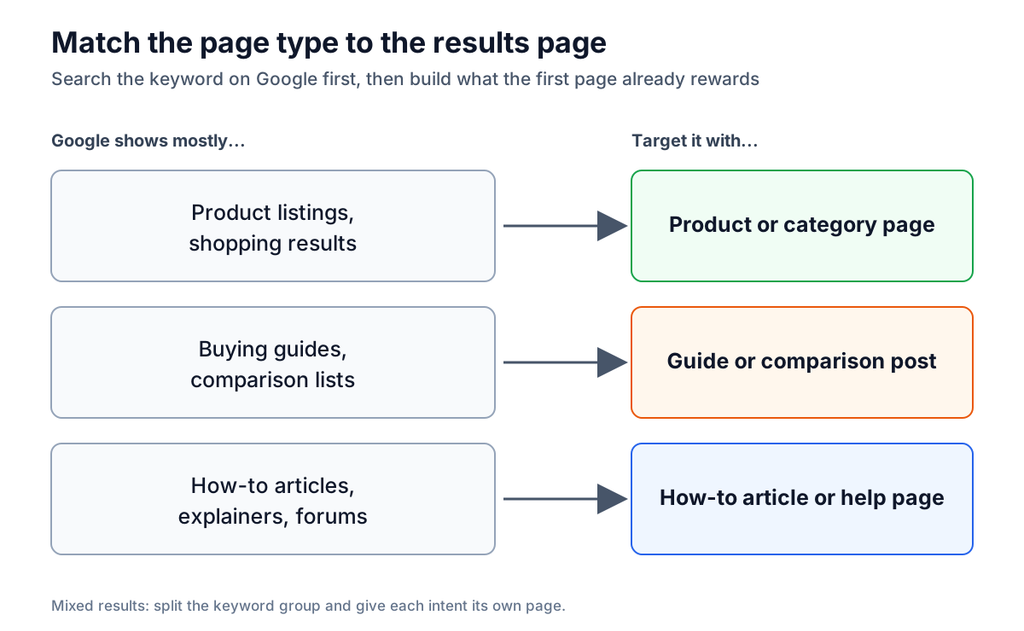
When the results are mixed, split the keyword group. A phrase that shows both product listings and guides usually hides two intents, and each deserves its own page instead of one page trying to serve both.
Step 4: Score keywords by revenue potential, not volume
Volume tells how many people search. It does not tell how many orders a page will bring. A simple formula makes the gap visible:
Expected monthly revenue = monthly searches x click rate x conversion rate x average order value (AOV)
Click rate is the share of searches that end in a click on your page, and it depends on the position the page can realistically reach. Conversion rate is the share of visits that become orders. Both should come from the store’s own data, not from industry averages: Search Console gives impressions and CTR per query and page, and the analytics platform gives conversion rate by landing page. Google itself cautions that actual performance from keywords depends on many factors, including budget, bids, ad quality and customer behavior in the industry, so any estimate of this kind is a ranking tool, not a forecast (Google Ads Help).
Here is a fictional example. A store sells office chairs at an average order value of $300. The volumes and rates below are invented for illustration, not benchmarks. The head term has the most searches, but the store is unlikely to rank near the top for it, so its click rate and conversion rate are both low.
| Keyword | Searches per month | Assumed click rate | Assumed conversion rate |
|---|---|---|---|
| office chair | 100,000 | 0.5% | 0.4% |
| ergonomic office chair | 18,000 | 1.5% | 1.2% |
| ergonomic office chair for back pain | 2,400 | 4% | 2.5% |
| mesh ergonomic office chair with headrest | 590 | 6% | 3.5% |
| best office chair for lower back pain | 3,600 | 3% | 1.0% |
| how to adjust an office chair | 1,900 | 4% | 0.3% |
The chart shows the result. In this example, “ergonomic office chair” earns the most at about $972 a month, even though “office chair” has more than five times its volume and earns about $600. “Ergonomic office chair for back pain” comes next at about $720 with only 2,400 searches. The informational phrase earns about $68, which is why it belongs in a guide that supports buying pages, not at the top of the production list.
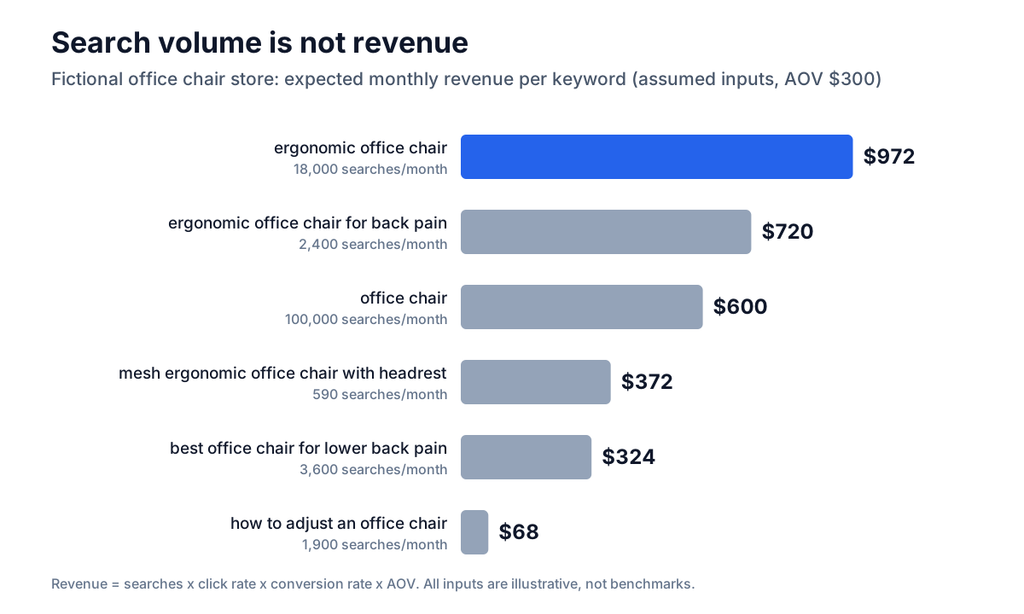
The point of the exercise is the ordering, not the dollar amounts. Replace the invented inputs with the store’s own CTR and conversion data, and re-sort the list. For conversion inputs, the ecommerce conversion rate optimization guide explains how to measure and improve them by page type.
Step 5: Map every keyword to exactly one page
A keyword map is a spreadsheet that assigns each target keyword to one URL. Without it, two pages end up competing for the same query, and important phrases get no page at all. Shopify recommends assigning one primary keyword and a few secondary keywords to each important page, and making sure they match the page’s purpose (Shopify).
A workable map needs seven columns: the primary keyword, two or three variants that share the same intent, the target URL, the page type from the Step 3 check, monthly searches, the Step 4 revenue estimate and the status (new page, update or skip). Group variants only when they share the same need and the same results page. “Ergonomic office chair” and “ergonomic office chairs” belong together; “ergonomic office chair” and “how to choose an ergonomic office chair” do not.
When a keyword has no matching page, decide between creating one and skipping the keyword. A new category or guide is worth it when the revenue estimate is high enough to pay for the work. Otherwise add it to the backlog. For existing pages, the guide to SEO for ecommerce product pages covers how to apply the assigned keywords on product pages.
Step 6: Put the keywords where shoppers and search engines look
Once the map exists, use each primary keyword where it helps both people and search engines understand the page: the page title, the main heading, product and category descriptions, the URL, image file names and alt text, and internal link anchors. Semrush and Shopify list the same placements (Semrush). Write for the shopper first. A title that repeats the phrase three times earns fewer clicks than one that names the product benefit once.
Keyword placement is one part of a wider organic strategy. The ecommerce SEO optimization guide shows how keyword work connects to site structure, content and links.
Step 7: Track results and refresh the list
Keyword research is not a one-time task. Search behavior shifts, competitors enter, and product lines change. A quarterly review is a reasonable rhythm for most stores, with a lighter monthly check on the pages that matter most. That cadence is an Anaia working rule, not a Google requirement.
Search Console supplies the data for both. Sort the Pages tab by CTR in ascending order to find pages that appear in results but earn few clicks, which Google says can signal that searchers do not think the page answers their query, and consider updating the title and description or aligning the content better with the queries that show the page. Google also recommends focusing more on trends in impressions and clicks than on position alone (Google Search Console Help). Judge changes against similar past periods, since Google notes that other events can also move results. Semrush suggests giving new pages a couple of months to settle before changing them.
How AI tools fit into keyword research
AI assistants are useful for brainstorming. Shopify’s guide describes prompting an assistant with a customer profile to surface the phrases, questions and objections that profile might have. Treat the output as a source of candidate phrases only. An assistant cannot report real search volume, so every candidate still needs a check in a keyword tool, Search Console or the results page itself. The same caution applies to the growing set of queries answered inside AI search. The generative engine optimization guide covers how those answers differ from classic results.
Common mistakes to avoid
Four mistakes come up repeatedly. The first is chasing volume: the biggest head term is usually the hardest to rank for and the least likely to convert. The second is skipping the results page check, which produces blog posts for phrases that Google answers with products, or product pages for phrases that Google answers with guides. The third is mapping two pages to the same keyword, which splits signals and makes performance hard to read. The fourth is treating the keyword list as finished. A map that is never revisited drifts away from the catalog and from what shoppers search.
Where to start this week
Pick one category with real revenue. Build a seed list from its products and customer reviews, expand it with Keyword Planner or a paid tool and the Search Console queries already showing that category, check the results page for the top ten phrases, score them with the revenue formula and write the map. That single category exercise takes a few hours and produces a template to repeat across the catalog. Start with the category where small gains pay most, and let the revenue estimate, not the volume column, set the order.
Stores that want a second opinion on which keywords and pages to prioritize can book the Revenue Growth Diagnosis to see where organic and conversion fixes are most likely to move revenue first. Teams that prefer to hand the work over can review Anaia’s ecommerce SEO, AEO and GEO services.
FAQ
Q1. What are good keywords for ecommerce?
Good ecommerce keywords are relevant to something the store sells, match the intent of the page that targets them, and show a realistic path to ranking. In practice that means a mix: category terms for collection pages, long-tail product and problem phrases for product pages and guides, and a few brand terms. Rank them by expected revenue instead of volume alone.
Q2. What search volume is good enough for an ecommerce keyword?
There is no universal threshold. Backlinko notes that a good volume depends on the business: a low-priced item may need a keyword with thousands of monthly searches, while a high-value product can justify a keyword with a few hundred, because fewer conversions still pay off (Backlinko). The revenue formula in Step 4 turns that judgment into a number.
Q3. Can ecommerce keyword research be done for free?
Yes, to a useful degree. Google Search Console is free and shows the queries a site already appears for. Google Keyword Planner is described by Semrush as free, though Google requires an Ads account with billing details to be set up first. Google’s autocomplete, “People also ask” and related searches add phrasing at no cost. Paid tools mainly add difficulty scores, intent labels and competitor comparisons.
Q4. Should an online store target informational keywords?
Yes, selectively. Informational terms rarely convert directly, but they can build awareness and link shoppers to product pages. Start with commercial and transactional keywords, and add informational guides once the product and category pages are covered or when the keyword is part of a buying decision, such as a comparison.
Q5. How many keywords should each page target?
One primary keyword plus a small group of variants that share the same intent and the same results page. Shopify suggests a primary keyword and a few secondary keywords per important page. If a second keyword needs a different kind of page, give it its own URL.
Q6. How often should an ecommerce store redo keyword research?
A full review every quarter works for most stores, with a monthly check on the highest-revenue pages and a refresh before each peak season. Update sooner after a major catalog change.

Passionate about the future of search, co-founder of Anaia Marketing and an SEO strategist focused on helping brands grow through search, strategic content, and AI-driven visibility. Her work sits at the intersection of technical SEO, content systems, and emerging AI search optimization, with a focus on building sustainable organic growth.