
To increase ecommerce traffic, start with the channels that already send buyers, then add one fast source (free Google product listings, email, or paid search) and one compounding source (SEO and content). Measure each by revenue per session, not by visits alone. The 11 ways below are ordered by how quickly they can pay and how much control you keep.
Most store owners can name a channel they want more of. Fewer can say which channel earns the most per visit. That gap is where traffic budgets get wasted, so this guide gives you a way to choose before you spend. If you want a second opinion on where your own store is leaking revenue, run the free diagnostic and get a clear next step.
Run the Revenue Growth Diagnosis and find which traffic source to fix first.
Check which traffic already earns revenue
Before adding a source, read your current mix. In Google Analytics 4, the default channel group sorts sessions into rule-based channels such as Organic Search, Paid Search, Email, Organic Social, Referral and Direct. Google also lists an AI Assistant channel for visits from tools like ChatGPT or Gemini, and states that Organic Search includes visits from Google’s AI Overviews and AI Mode (Google Analytics Help, default channel group). Those definitions cannot be edited, which keeps your comparisons consistent over time.
Then calculate revenue per session for each channel: channel revenue divided by channel sessions, over the same period. Here is a fictional store, used only to show the method:
| Channel | Sessions | Revenue | Revenue per session |
|---|---|---|---|
| Organic Search | 4,000 | $5,200 | $1.30 |
| 1,000 | $2,500 | $2.50 | |
| Direct | 2,000 | $2,500 | $1.25 |
| Paid Social | 3,000 | $1,800 | $0.60 |
| Total | 10,000 | $12,000 | $1.20 |
Email is the smallest channel here, yet it earns more than four times what paid social earns per visit. In that store, growing the email list is a better first move than buying more social clicks. Your numbers will differ; the point is to decide with them.
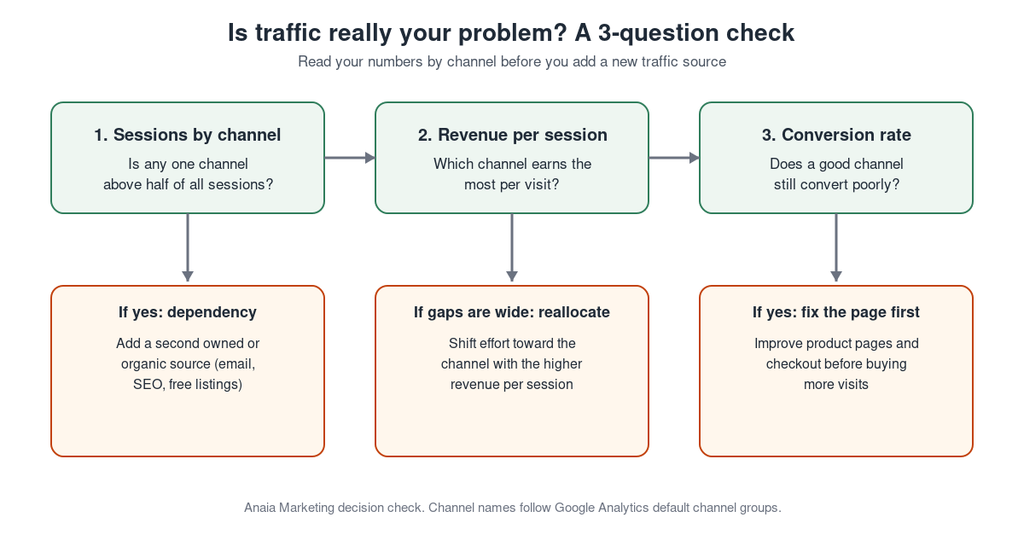
Three-question check: sessions by channel, revenue per session, and conversion rate, each with the action to take
11 ways to increase ecommerce traffic
The ways below are grouped by time to impact. Timelines depend on your market, budget and starting point, so treat them as an order of operations, not a promise.
Fast levers: days to weeks
1. Turn on free product listings in Google Merchant Center. Google says free listings can show your products at no cost across Search, Images, Shopping, Maps, YouTube, Lens and Gemini, and that they generate organic traffic (Google Merchant Center Help). For new accounts, free listings are on by default, but the status does not guarantee your products will show. Google relies on the product data you provide, so accurate titles, prices, availability and shipping settings are the work. In the United States, Google requires shipping settings or costs in your product data. This is the lowest-cost path for most stores that sell physical products.
2. Build an email list and send flows that bring people back. Email visits come from people who already know you. Capture addresses with a clear offer, then automate a welcome flow, a cart reminder and a post-purchase message. Track the result in the Email channel so you can compare its revenue per session with the others. Our guide to ecommerce customer acquisition shows how this fits with the rest of your acquisition mix.
3. Run paid search on buying keywords only. Paid search is the quickest way to reach shoppers who are already looking for your product type. Start with brand terms and a few product-specific terms, cap spend, and judge each campaign by revenue per session and margin. Pause terms that bring clicks without orders.
4. Retarget visitors who left without buying. Many shoppers do not buy on the first visit. Retargeting on paid social or search brings them back with the product they viewed. Keep audiences small and time-limited, and measure whether the returning sessions convert better than your average.
Compounding sources: weeks to months
5. Optimize category and product pages for search. Category and product pages carry the buying intent. Clear titles, unique descriptions, internal links and fast pages are the base. The full method is in our guide to ecommerce SEO optimization.
6. Target specific, lower-competition searches. A narrow query such as a product plus a use case brings fewer visits than a broad term, but those visits are closer to buying. Use ecommerce keyword research to map each query to one page and to avoid two pages competing for the same intent.
7. Publish content that answers buying questions. Write about the questions shoppers ask before they buy: how to choose, sizing, comparisons, care and alternatives. Link each article to the category or product it helps with. Our ecommerce content strategy framework explains how to plan this without publishing for the sake of volume. Google states that no special optimization or schema.org markup is required for its AI features (Google Search Central), so the same clear, useful pages serve both classic results and AI answers.
8. Refresh the pages you already have. Before writing something new, check which pages lost impressions or clicks in Google Search Console over the last 90 days compared with the previous 90. Update facts, add missing answers, fix broken links, and improve the title. A real update, not a changed date, is what earns the benefit.
9. Earn links to the pages that sell. Links from relevant sites help your pages gain trust and bring referral visits. Start with suppliers, partners, local press and useful resources. See our guide to ecommerce link building for tactics that fit a store.
Reach multipliers: ongoing
10. Use social and short video to show products in use. Organic social rarely brings the highest revenue per session, but it makes people aware of your brand and supplies content for retargeting and email. Pick the one or two platforms where your buyers already spend time and post demonstrations, reviews and customer photos.
11. Set up partnerships and affiliates. Referral and affiliate traffic comes from other sites recommending you. Offer creators, review sites and complementary brands a clear arrangement, give them tracked links, and review the Referral and Affiliates channels in Analytics before expanding.
Choose where to start
You cannot run all 11 well at once. Choose by your current situation:
| Your situation | Start with | Then add |
|---|---|---|
| New store, little traffic | Free listings (1), email capture (2) | Category and product SEO (5) |
| One channel brings most sales | A second source: email (2) or SEO (5) | Content (7) |
| Good traffic, weak sales | Fix pages first (see below) | Retargeting (4) |
| Strong organic base | Content refresh (8) and links (9) | Partnerships (11) |
When two options look equal, pick the one you can measure in Analytics within a month.
When more traffic is not the fix
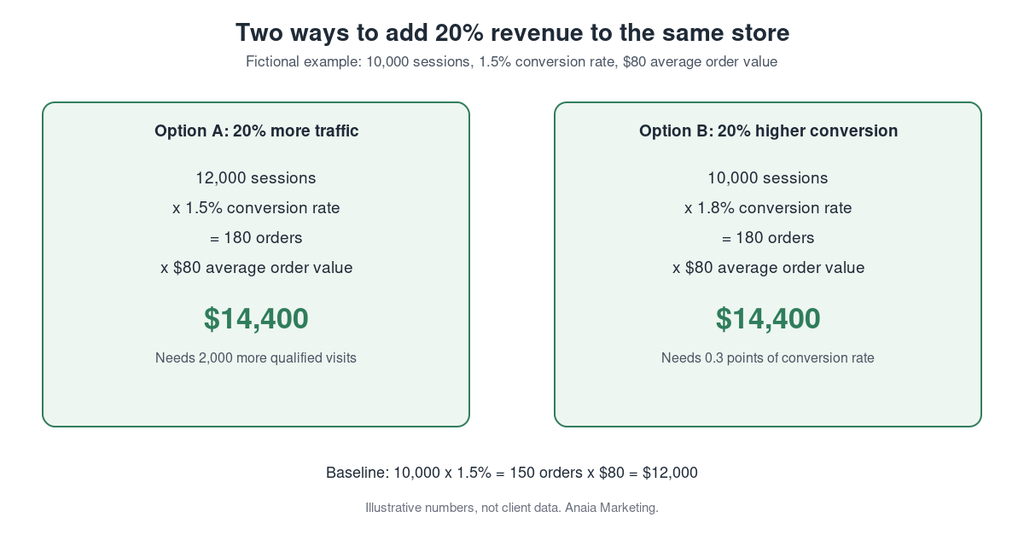
More visits only help if visitors can buy. A short calculation shows why. Take a fictional store with 10,000 sessions, a 1.5% conversion rate and an $80 average order value: 150 orders and $12,000 in revenue. Adding 20% more traffic (12,000 sessions) gives 180 orders and $14,400. Raising conversion from 1.5% to 1.8% on the original 10,000 sessions gives the same 180 orders and $14,400, without paying for a single extra visit.
If your revenue per session is low across every channel, look at the page before the channel. Slow product pages, unclear shipping costs and a long checkout lose sales that no traffic source can rescue. Our guide to ecommerce conversion rate optimization covers that work.
What to do this week
Open your Analytics acquisition report and calculate revenue per session for each channel. Check that Merchant Center free listings are active and your product data is complete. Pick one fast lever and one compounding source from the grid above, set a four-week review date, and compare revenue per session when it arrives. That sequence gives you a decision based on your own store, not on a list of tactics.
Next step: turn the right traffic into predictable revenue
The strongest traffic plan is a short one: know which channels pay, add one fast source and one compounding source, and fix the pages that waste the visits you already earn. Each of the 11 ways here works better when it is measured by revenue per session and linked to a page built to convert. If you want help deciding where your store should start, we will walk through your channels and conversion path with you.
Book your free Revenue Growth Diagnosis and get a prioritized traffic and conversion plan.
FAQ
Q1. Why is my website traffic so low?
Common causes are pages that are not indexed, product pages that do not match what people search for, thin category descriptions, and relying on one channel. Check indexing and impressions in Google Search Console first. If pages are indexed but get few impressions, the targeting is the likely issue; if they get impressions but few clicks, look at titles and descriptions.
Q2. What is the fastest way to increase ecommerce traffic?
The fastest options are paid search on high-intent keywords and email to an existing list. Free product listings in Google Merchant Center can also start quickly if your product data is accurate, though Google does not guarantee that products will show.
Q3. What is the cheapest way to get more ecommerce traffic?
Free product listings, email to your own list and refreshing existing pages cost the least in cash. They take time instead: product data work, list building and content updates.
Q4. How long does it take to increase ecommerce organic traffic?
There is no guaranteed timeline. SEO changes usually need weeks to months before Search Console shows a trend, and results depend on your competition and site. Review impressions, clicks and CTR at 30, 60 and 90 days rather than expecting a fixed date.
Q5. How do I know if my traffic is good?
Good traffic converts and earns. Compare revenue per session, conversion rate and average order value by channel over the same period. A channel with fewer visits and higher revenue per session is better than one with more visits and little revenue.

Founder & CEO of Anaia Marketing, Dominique doesn’t manage traffic. He builds systems that grow revenue, predictably, measurably, without guesswork. With 15+ years at the intersection of search strategy and editorial precision, he focuses on what matters : turning organic growth into a compounding asset that moves revenue.