
Magento ecommerce SEO is the work of configuring a Magento Open Source or Adobe Commerce store so that search engines find, crawl and rank the right product and category pages, and ignore the duplicates and filter URLs the platform can generate.
Magento gives you more SEO control than most platforms, but several of its defaults are not set for SEO. Canonical tags, for example, are switched off in the code that ships with the platform. The fastest wins come from checking a handful of Admin settings, deciding how filter URLs are handled, and keeping the store on a supported version.
This guide lists those settings with their real default values, explains what changing each one costs on a live store, and ends with an audit you can run today. If you would rather have someone look at where your store loses organic revenue, start with the diagnostic.
What Magento ecommerce SEO covers
Magento SEO sits on three layers. The first is configuration: canonical tags, URL format, redirects, robots.txt and the XML sitemap, all set in the Admin. The second is catalog content: titles, meta descriptions, category copy and product descriptions, written at a scale of hundreds or thousands of pages. The third is the platform itself: the version you run, its speed, and the extensions and theme that sit on top of it.
The general principles are the same as for any store, and they are covered in the ecommerce SEO optimization guide. What changes on Magento is where each setting lives, what it does by default, and how expensive it is to change once thousands of URLs are indexed.
One naming point before going further. Magento Open Source is the free edition. Adobe Commerce is the paid edition, sold on Adobe’s cloud infrastructure or installed on your own servers. Adobe now also offers Adobe Commerce as a Cloud Service, with a different storefront: Adobe marks its Admin SEO documentation as applying to the platform-as-a-service editions and sends Cloud Service users to separate storefront SEO guidelines (Adobe, Meta data). The settings below apply to Magento Open Source and to Adobe Commerce on cloud infrastructure or on premises.
Check your version first, because support dates are an SEO risk
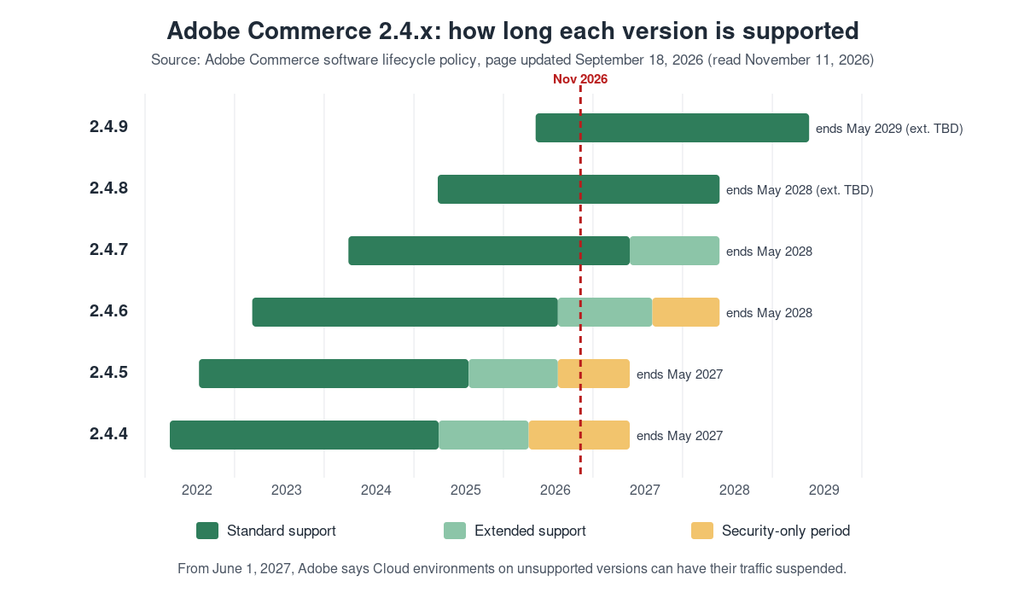
Most Magento SEO guides skip this step, yet it decides what you can safely do next. Adobe gives each Adobe Commerce release three years of standard support from its general availability date, and publishes end dates for every 2.4 release line (Adobe Commerce lifecycle policy, page updated 18 September 2026).
| Release | General availability | End of standard support | End of extended support |
|---|---|---|---|
| 2.4.9 | 12 May 2026 | 31 May 2029 | Not yet announced |
| 2.4.8 | 8 April 2025 | 31 May 2028 | Not yet announced |
| 2.4.7 | 9 April 2024 | 31 May 2027 | 31 May 2028 |
| 2.4.6 | 14 March 2023 | 11 August 2026 | 31 August 2027 |
| 2.4.5 | 9 August 2022 | 12 August 2025 | 11 August 2026 |
| 2.4.4 | 12 April 2022 | 12 April 2025 | 14 April 2026 |
Source: Adobe Commerce lifecycle policy, read 11 November 2026. Adobe also lists a security-only period for 2.4.4 and 2.4.5 (to 31 May 2027) and 2.4.6 (to 31 May 2028).
Why does this belong in an SEO guide? Adobe states that from 1 June 2027 it will no longer maintain Cloud environments running unsupported versions, and that this can include suspending traffic so the storefront goes offline. A store that is offline cannot rank. A rushed upgrade or replatforming is also a URL migration, and migrations are where stores lose the most organic traffic. If your release is in the table’s last three rows, plan the upgrade with SEO in the project from day one: a full URL inventory, redirect mapping and a crawl before and after.
The Magento SEO settings that matter, with their real defaults
The table below lists the settings that shape how search engines see your catalog. The default values come from the configuration file that ships in the Magento source code (Magento Catalog module config.xml, branch 2.4-develop, read 11 November 2026). An agency, a theme or a previous developer may have changed them on your store, so check each one in your Admin rather than assuming.
| Setting (Stores > Settings > Configuration > Catalog > Catalog > Search Engine Optimization) | Default in the code | Recommended | Risk of changing it on a live store |
|---|---|---|---|
| Use Canonical Link Meta Tag for Products | No | Yes | Low: adds a tag, changes no URL |
| Use Canonical Link Meta Tag for Categories | No | Yes | Low |
| Use Categories Path for Product URLs | No | Keep No unless you have a strong reason | High: changes every product URL |
| Product URL Suffix | .html | Keep what is indexed | High: changes every product URL |
| Category URL Suffix | .html | Keep what is indexed | High: changes every category URL |
| Create Permanent Redirect for URLs if URL Key Changed | Yes | Keep Yes | High if switched off: renamed products lose their redirects |
These fields are set at the store view scope. If you run several store views, for example one per country or language, check the values in each view and not only in the default configuration.
Canonical tags: switch them on for products and categories
A canonical tag tells search engines which URL is the main version of a page when several URLs show the same content. Adobe’s documentation shows how Magento can create these duplicates: with the category path in product URLs, the same backpack is reachable at /gear/bags/driven-backpack.html and /driven-backpack.html. With product canonicals enabled, the product page points to the short domain/product-url-key version, because product URL keys are unique. Adobe recommends enabling canonical tags for both categories and products (Adobe, Meta data).
Since both switches are off in the default configuration, this is one of the first changes to check on a Magento store, and it does not alter any URL. After enabling them, flush the cache and check the page source of one product and one category for a rel="canonical" link.
URL suffix and category path: decide once, then leave them alone
The .html suffix does not hurt rankings by itself. What hurts is changing it after the pages are indexed, because every product and category URL changes at once. The same is true for adding the category path to product URLs, which also brings back the duplicate problem the canonical tag has to solve.
Decision flow before changing a Magento URL setting: if the store is not live, choose the final format before launch; if it is live, keep the current format unless the gain justifies re-crawling every URL, in which case plan it as a migration with 301 redirects, updated internal links and sitemap, and Search Console monitoring.
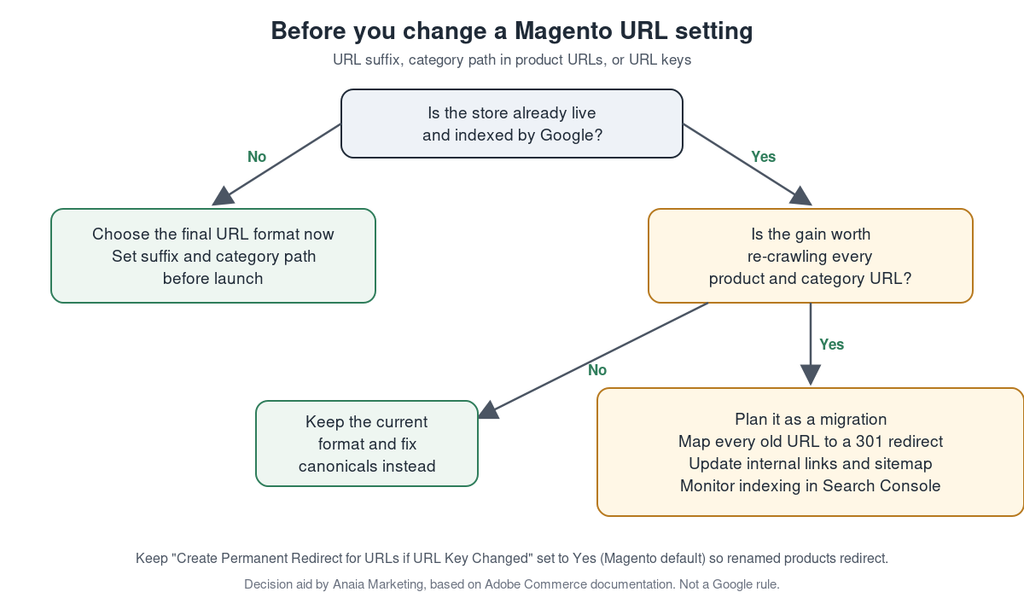
On a new store, choose the format before launch. On a live store, the default answer is to keep the current format and fix duplicates with canonical tags. If you still decide to change it, treat the change as a migration: map every old URL to its new one with a 301 redirect, update internal links and the sitemap, and monitor indexing in Google Search Console.
Redirects when a URL key changes: keep the default
When “Create Permanent Redirect for URLs if URL Key Changed” is set to Yes, Magento creates a permanent redirect each time someone edits a product or category URL key. Merchandisers rename products more often than SEO teams expect, so leave this on. Review the redirects under Marketing > SEO & Search > URL Rewrites from time to time to spot chains, where one old URL redirects to another redirect before reaching the live page.
A related global setting, “Generate category/product URL Rewrites”, is off by default in the CatalogUrlRewrite module. Adobe warns that saving this data into the rewrite tables can degrade performance on categories with many products, so turn it on only if a developer has a specific reason.
Layered navigation and internal search URLs
Layered navigation is Magento’s name for the filters on category and search pages (color, size, price and other attributes). Each filter adds a query parameter to the URL, such as ?color= or ?price=, and the sort and display options add others, such as product_list_order, product_list_dir, product_list_limit and product_list_mode. Internal search results live under /catalogsearch/. Left alone, these combinations can produce far more crawlable URLs than you have products.
The method for deciding which filter pages deserve to rank is the same on every platform, and it is set out step by step in the ecommerce technical SEO guide. On Magento, three points need particular care.
First, give each type of URL one treatment, not two. A common mistake is to block filter parameters in robots.txt and also add a noindex tag to the same pages. Google states that a noindex rule is only seen if the page is not blocked by robots.txt; when it is blocked, the crawler never reads the noindex and the URL can still appear in results if other pages link to it (Google Search Central, noindex). Choose robots.txt when you want to save crawling, and noindex when you need a page crawled but kept out of the index.
Second, check what your robots.txt actually blocks. Open yourdomain.com/robots.txt and look for your filter parameters and /catalogsearch/. In Magento, the instructions are edited under Content > Design > Configuration, in the Search Engine Robots section of the relevant scope. A rule set for filters and sorting could look like this, to be adapted to the attribute codes your store really uses:
User-agent: *
Disallow: /catalogsearch/
Disallow: /*?*product_list_order=
Disallow: /*?*product_list_dir=
Disallow: /*?*product_list_limit=
Disallow: /*?*product_list_mode=
Disallow: /*?*price=
Disallow: /*?*color=
Test the rules in Search Console before relying on them, and never block a parameter that a page you want to rank depends on.
Third, when a filter combination matches real search demand, such as “waterproof hiking boots”, the better answer is often a real category with its own URL, title, copy and canonical, rather than an indexed filter URL. Ecommerce keyword research tells you which combinations have that demand.
XML sitemap: what to configure and what to ignore
Magento generates sitemaps natively. The settings are under Stores > Settings > Configuration > Catalog > XML Sitemap, and generation is managed under Marketing > SEO & Search > Site Map. Set generation to run automatically, enable “Enable Submission to Robots.txt” if you want the sitemap location added to robots.txt, then submit the sitemap in Search Console.
Magento lets you set a frequency and a priority for categories, products and CMS pages. Google states that it ignores the priority and changefreq values, and uses lastmod only when it is consistently accurate (Google Search Central, build and submit a sitemap). Do not spend time tuning those fields. Spend it on what Google does read: the list of URLs. The sitemap should contain only canonical, indexable URLs that return a 200 status, and no filter, search or out-of-catalog pages. Google’s limit is 50,000 URLs or 50 MB uncompressed per file; Magento’s “Maximum No of URLs per File” and “Maximum File Size” fields split large catalogs into several files.
Metadata and content at catalog scale
Each product and category has a Search Engine Optimization section in the Admin with a URL key, meta title and meta description. Adobe recommends a meta title unique to each page and under 70 characters, and a meta description of about 150 to 160 characters, even though the field accepts up to 255 (Adobe, Meta data). Treat those lengths as working guides; Google decides what to display.
Magento can fill product meta fields from templates, which is useful for the long tail of a large catalog. Templates produce near-identical titles, though, so write titles and descriptions by hand for the categories and products that bring the most revenue. The same logic applies to page content: replace manufacturer descriptions on your best sellers, and add a short block of useful copy to key category pages. The product page SEO framework shows how to structure that work.
Adobe also notes that structured data based on schema.org is added to the product template by default. Themes and extensions can change or duplicate that markup, so test a product URL with Google’s Rich Results Test after any theme or extension change, and make sure prices, availability and reviews in the markup match what the page shows.
Speed, themes and extensions
Magento is a heavy application, and speed problems usually come from the hosting, the cache configuration, the theme or the number of third-party extensions, not from one SEO setting. Check that full page caching is active under System > Tools > Cache Management, measure product and category templates in PageSpeed Insights, and ask your developer which extensions add scripts to every page.
SEO extensions can help on large catalogs, mainly for bulk metadata templates, canonical rules and hreflang tags across store views. Before installing one, list the problems from your audit and check that the extension solves them without duplicating what Magento already does. Two systems writing canonical tags or structured data to the same page create conflicts that are hard to trace.
A 30-minute Magento SEO audit, in order of risk
This order puts the checks that can cost the most visibility first. It is an Anaia working method based on the documentation cited above, not a Google rule.
- Version. Note your Magento or Adobe Commerce release and compare it with Adobe’s support dates. If support ends within 12 months, start planning the upgrade with an SEO owner.
- Canonical tags. Open one product and one category, view the source and confirm a
rel="canonical"link that points to the clean URL. If it is missing, enable both settings. - Duplicate product paths. Check whether “Use Categories Path for Product URLs” is on, and whether category pages link to products through long or short URLs.
- Redirect setting. Confirm “Create Permanent Redirect for URLs if URL Key Changed” is set to Yes in every store view.
- robots.txt. Open it and confirm it covers your filter, sort and internal search URLs, without combining those rules with noindex on the same pages.
- Sitemap. Open the sitemap file and spot-check ten URLs: each should be canonical, indexable and return a 200 status. Confirm it is submitted in Search Console.
- Indexing report. In Search Console, look at the pages report for large numbers of “Duplicate without user-selected canonical” or “Crawled – currently not indexed” URLs, which often point back to steps 2 to 5.
- Top revenue pages. For your ten best-selling products and five main categories, check that titles and descriptions are written by hand and that the page content is not a copy of the manufacturer’s text.
Steps 1 to 6 need only Admin access and a browser. Steps 7 and 8 need Search Console and your sales data.
Turning Magento’s flexibility into organic revenue
Magento rewards stores that configure it on purpose. Canonical tags off by default, URL formats that are costly to change, filter URLs that multiply, and a support calendar that can take a storefront offline all sit in the platform’s own configuration, which means they can be fixed by people who know where to look. Start with the version and the canonical tags, settle the URL format once, give each type of filter URL a single treatment, and keep the sitemap limited to pages that deserve to rank. Then put the writing effort on the categories and products that already sell. When the configuration is clean, every hour spent on content and links has a better chance of turning into revenue. If you want a team to run this audit and the fixes for you, the ecommerce SEO services page explains how Anaia Marketing works on SEO, AEO and GEO, and the Predictable Revenue Growth (PRG) System starts with a short diagnostic.
Book your Revenue Growth Diagnosis and get a prioritized SEO plan for your Magento store.
FAQ
Q1. What is Magento SEO?
Magento SEO is the optimization of a Magento Open Source or Adobe Commerce store for organic search. It combines platform configuration (canonical tags, URL format, redirects, robots.txt and sitemaps), catalog content (titles, descriptions and category copy) and technical health (version, speed and extensions).
Q2. Is Magento good for SEO?
Magento gives detailed control over URLs, metadata, canonical tags, redirects and sitemaps, and supports several store views for different countries or languages. Several of those controls are not set for SEO by default, however, so a Magento store needs deliberate configuration to perform well in search.
Q3. Which ecommerce platform is best for SEO?
No platform ranks a store on its own. Magento, Shopify and WooCommerce can all rank well when duplicates, filter URLs, speed and content are handled correctly. The better question is which platform your team can configure and maintain properly, given the size of your catalog and your technical resources.
Q4. Should I remove .html from my Magento URLs?
On a new store, you can choose either format before launch. On a live store, removing the suffix changes every product and category URL, so it requires a complete set of 301 redirects and a period of re-crawling. Unless there is a strong business reason, keep the indexed format and focus on canonical tags and content.
Q5. Do I need a Magento SEO extension?
Not always. Core Magento covers canonical tags, URL rewrites, redirects, robots.txt and sitemaps. An extension becomes useful on large catalogs or multi-store setups, for example for bulk metadata templates or hreflang tags, as long as it does not duplicate what the core already outputs.

Passionate about the future of search, co-founder of Anaia Marketing and an SEO strategist focused on helping brands grow through search, strategic content, and AI-driven visibility. Her work sits at the intersection of technical SEO, content systems, and emerging AI search optimization, with a focus on building sustainable organic growth.