

Ecommerce technical SEO is the work of making sure search engines can find, render, index and understand the product and category pages that earn revenue, while keeping the thousands of low-value URLs that stores generate out of the way. The order matters: fix how pages are discovered first, then which URLs are allowed in the index, then rendering, status codes, sitemaps, product data and speed.
This guide walks through those eight steps, includes a fictional example showing how five product filters can create over one million URLs, and ends with an audit order a small team can run in an afternoon.
What ecommerce technical SEO covers
Technical SEO is the part of search optimization that deals with how a site is built rather than what its pages say. It decides whether Google can crawl (fetch) a page, render it (run its code to see the final content), and index it (store it so it can appear in results). On-page work such as titles, descriptions and product copy sits on top of that foundation; the guide to SEO for ecommerce product pages covers it.
Online stores need their own version of the topic because of how they are built. A catalog turns a few hundred products into thousands of URLs through filters, sorting, variants, pagination and internal search. Products go out of stock or are discontinued. Themes and apps add JavaScript. Each of these can quietly hide revenue pages or flood Google with pages nobody searches for.
Does your store need to worry about crawl budget?
Crawl budget is the number of URLs Google is willing and able to fetch on a site in a given period. Google says that most sites do not need to manage it. Its guidance is aimed at sites with roughly 1 million or more unique pages that change about weekly, sites with 10,000 or more unique pages that change daily, and sites where a large share of URLs sit in the “Discovered – currently not indexed” status in Search Console, and it describes these numbers as rough estimates, not exact thresholds (Google Search Central, crawl budget).
That gives a practical triage. The table below is a working rule from Anaia, built on Google’s estimates, not a Google threshold.
| Store profile | Crawl budget a concern? | Start with |
|---|---|---|
| Under 1,000 indexable pages, few filters | Unlikely | Steps 1, 4, 5 and 7: discovery, status codes, rendering, product data |
| A few thousand products, filters and variants | Possible if filter URLs are linked | Step 2 first: filter and sort URLs |
| 10,000+ pages with daily changes | Yes | Steps 2, 3 and 6, then monitor Crawl Stats |
| Many URLs in “Discovered – currently not indexed” | Yes, whatever the size | Step 2, then check server speed and sitemap quality |
Even when crawl budget is not a concern, duplicate and low-value URLs still dilute which version of a page Google picks. Most steps below apply to every store.
Step 1: Make every revenue page easy to discover
Google infers which pages matter from internal links, including how many clicks it takes to reach a page and how many links point to it. Products reachable only through a search box cannot be found by crawling, so category pages must link directly to their products, and menus should lead from categories to subcategories to products (Google Search Central, site structure).
Three rules cover most stores:
- Use real links. Google follows
<a href>links, not links built only with JavaScript events. - Keep one URL form per page. Use descriptive paths, a consistent form in internal links, sitemaps and canonical tags, and a self-referencing canonical on indexable pages. Where a variant has an optional query parameter, the canonical should be the URL with the parameter omitted (Google Search Central, URL structure).
- Do not link to temporary parameters such as session IDs or tracking codes.
Best sellers deserve extra internal links from the home page and from content. Google lists this directly as a way to signal which products matter. The ecommerce SEO optimization guide covers how category structure fits into the wider organic plan.
Step 2: Control filter, sort and faceted navigation URLs
Faceted navigation, the filters that let shoppers narrow a category by color, size, brand or price, is the most common source of URL bloat in ecommerce. Google states that faceted URLs can create an effectively infinite URL space, which causes overcrawling and slower discovery of new useful URLs (Google Search Central, faceted navigation).
How fast the URL count grows: a fictional example
The numbers below come from a fictional store, not a client. Each category offers five filters: 8 colors, 6 sizes, 10 brands, 5 price bands and 4 materials. For each filter a shopper picks one value or none, and filters always appear in the same order in the URL.
Listing URLs per category = (8+1) × (6+1) × (10+1) × (5+1) × (4+1) = 20,790. Remove the unfiltered page and 20,789 filter URLs remain.
Across 50 categories that is 1,039,450 filter URLs, for a catalog of 2,000 products. That is about 520 filter URLs for every product. If filters can appear in any order, the count is higher still.
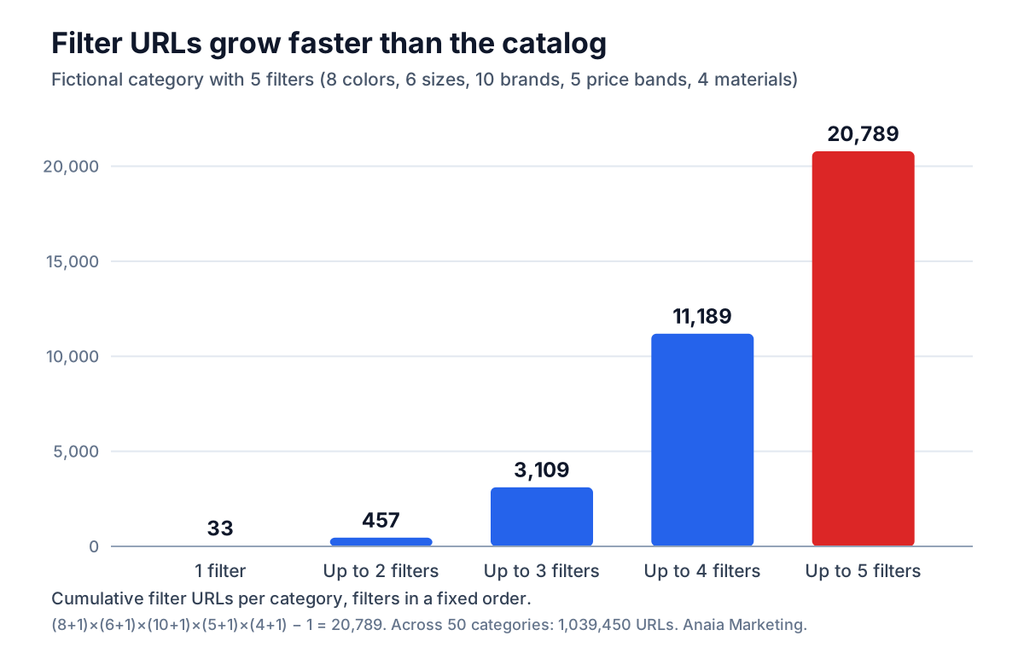
Not all of these URLs get crawled, and most would never be indexed. The point is the size of the pool a crawler can reach through links. Count it for any store by multiplying each filter’s number of values plus one, then comparing the result with the number of pages that should rank. This 520-to-1 ratio is a diagnostic, not a Google rule.
Decide URL by URL, not filter by filter
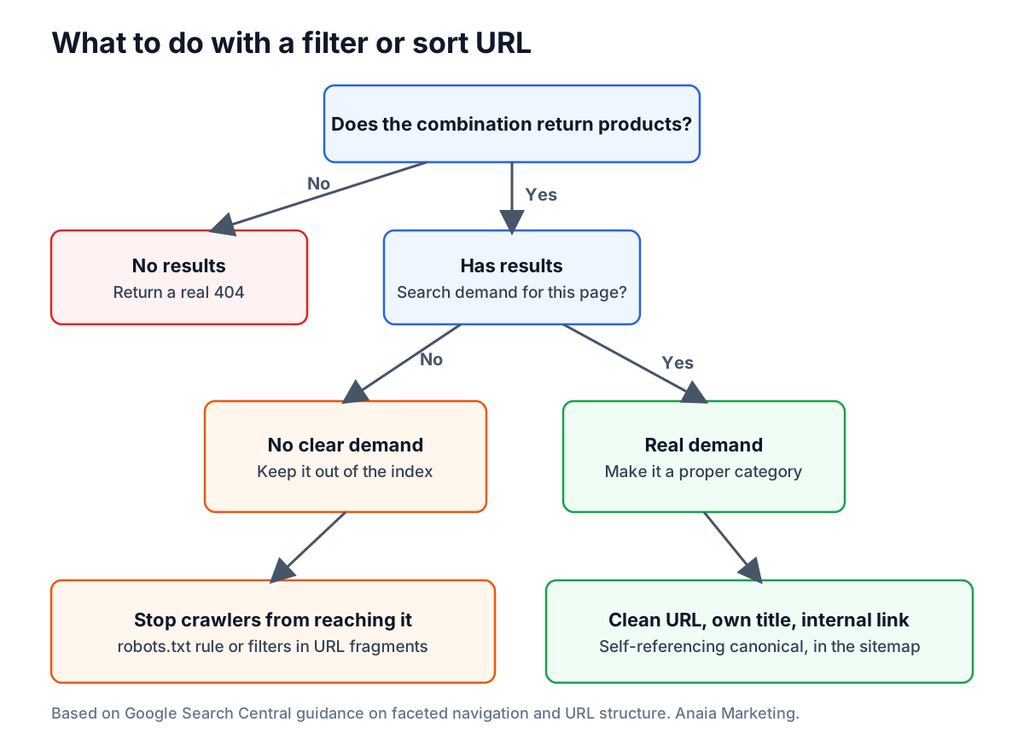
A useful decision is to ask whether the combination has results, and whether people search for it. A combination such as “women’s running shoes, waterproof” may deserve its own page. “Women’s running shoes, size 7, blue, $50 to $75” almost certainly does not.
Decision flow for filter and sort URLs: return a real 404 if no products match; if products match and there is search demand, make a clean category URL with its own title, internal link and self-referencing canonical; if there is no demand, stop crawlers from reaching it with a robots.txt rule or URL fragments
Google offers several ways to keep unwanted faceted URLs from being crawled. They are not equal:
| Method | What it does | Watch out for |
|---|---|---|
| robots.txt disallow | Stops crawling of matching URLs; Google’s example blocks parameters such as color= and size= while allowing one unfiltered listing page | A blocked URL can still be indexed without a description if other sites link to it, and Google cannot read a noindex tag on a URL it is not allowed to fetch (robots.txt introduction) |
Filters in URL fragments (#) | Fragments are not crawled or indexed, so they create no crawl load | Only works if the filtered view does not need its own ranking page |
| rel=”canonical” to the unfiltered page | May reduce crawling over time | Google calls it generally less effective than the other methods in the long term |
| rel=”nofollow” on filter links | Discourages following | Works only if every link to that URL carries it |
| noindex | Keeps a URL out of the index | Does not save crawl effort, because Google still requests the page |
Google’s guidance for filters that should be crawled and indexed is specific: use the standard & separator between parameters, keep the order of path-encoded filters fixed, avoid duplicate filters, and return an HTTP 404 for combinations with no results rather than redirecting to a generic error page.
Step 3: Handle pagination and product variants
Pagination, load-more buttons and infinite scroll each have trade-offs, but Google’s crawlers follow <a href> links and do not click buttons. The guidance for paginated categories is to link pages sequentially with real links, give each page a unique URL such as ?page=2 (never a # fragment), and give each page its own canonical rather than pointing every page to page 1. Google no longer uses rel="next" and rel="prev", and pages in a series may share titles and descriptions. Sort and filter variants should be kept out of the index with noindex or a robots.txt block. A sitemap or a Merchant Center feed helps make sure every product can be found (Google Search Central, pagination).
Variants (a shirt in five colors and four sizes) raise a different question: one page or many? Both are acceptable in Google’s documentation. A variant can live on a path (/t-shirt/green) or a parameter (/t-shirt?color=green); with optional parameters, the canonical is the URL without them. Whichever pattern a store uses, it should be consistent, and variants with their own URLs should be reachable through crawlable links.
Step 4: Return the right status code for removed and out-of-stock products
Status codes tell Google what happened to a page, and stores generate many “gone” pages. Google recommends a 404 or 410 for permanently removed pages, asks site owners to eliminate soft 404s (pages that show a “not found” message but return a success code), and advises avoiding long redirect chains, in its crawl budget guidance. Google’s redirect documentation prefers permanent server-side redirects (301 or 308) when a redirect will not be reversed (Google Search Central, redirects).
Google does not publish a product-specific rulebook for out-of-stock items, so the table below applies its general guidance to common situations. It is Anaia’s reading of that guidance, not an official Google table.
| Situation | Suggested handling | Why |
|---|---|---|
| Temporarily out of stock, will return | Keep the page live, show availability clearly, mark availability in product data | Page keeps its links and history |
| Discontinued, close replacement exists | 301 to the replacement, only if it is a genuinely equivalent product | Shoppers and links land somewhere useful |
| Discontinued, no replacement | 404 or 410 | Honest signal for a permanently gone page |
| Empty category | noindex, or 404 if removed from browse and search | Google’s URL guidance lists both options |
| Filter combination with no results | 404 | Google’s faceted navigation guidance |
| Custom “not found” page | Must still return a 404 status | Otherwise it is a soft 404 |
The mistake to avoid is redirecting every removed product to the home page or a generic category, which looks helpful but sends shoppers and Google somewhere unrelated.
Step 5: Make sure JavaScript does not hide products or links
Google queues pages with a 200 status for rendering, but it can only index what appears in the rendered HTML. Links must be <a> elements with an href, and routing based on URL fragments is not reliably followed; Google points single-page apps to the History API. If JavaScript changes the canonical tag, it must match the canonical in the original HTML, and a noindex tag in the original HTML may not be reversible by JavaScript. Where possible, server-side rendering or pre-rendering is safer (Google Search Central, JavaScript SEO basics).
A quick check for any template: open a category page, view the page source, and confirm that product links appear as real <a href> links in the HTML. Then run a representative product, category and filter URL through the URL Inspection tool in Search Console and compare the rendered HTML with what shoppers see. Review widgets, “load more” grids and variant selectors are the most common places where content or links exist only after a script runs.
Step 6: Keep sitemaps clean and honest
A sitemap is a hint about which URLs to crawl, not a command. Google’s guidance is to include the URLs that should appear in search results, in canonical and fully qualified form. A single sitemap file is limited to 50 MB uncompressed or 50,000 URLs, so large catalogs need several files under a sitemap index. Google uses the lastmod date only when it is consistently and verifiably accurate, reflecting the last significant change to main content, structured data or links, and it ignores priority and changefreq (Google Search Central, build a sitemap).
For a store, that means excluding redirected URLs, 404s, noindex pages, filter URLs and non-canonical variants. Many ecommerce platforms generate a sitemap automatically, so the task is usually auditing what is in it rather than creating it. A sitemap full of URLs Google refuses to index is a sign that something upstream is wrong.
Step 7: Add product structured data that matches the page
Structured data is markup that describes a page’s content in a format Google reads. For products, Google distinguishes two cases: product snippets, for pages where people cannot buy the product directly (such as editorial reviews), and merchant listings, for pages where customers can buy. Meeting the merchant listing requirements also makes a page eligible for product snippets, and providing both on-page markup and a Merchant Center feed maximizes eligibility (Google Search Central, product structured data).
For variants, Google documents ProductGroup, which uses variesBy, hasVariant and productGroupID to group variants of a single parent product, alongside Product markup for each variant. Each variant should carry its own identifier, such as a sku or gtin14, and shared attributes such as brand belong to the group. Google’s examples assume markup that does not change dynamically as shoppers select variants, and it recommends including Product markup in the initial HTML, because JavaScript-generated markup can make Shopping crawls less frequent and less reliable (Google Search Central, product variants).
The practical rule: the markup must describe what is visible on the page, price and availability included. Test representative templates with Google’s testing tools after every theme or app change.
Step 8: Hit the Core Web Vitals targets on product and category pages
Core Web Vitals are Google’s measures of loading, responsiveness and visual stability. Its “good” thresholds are a Largest Contentful Paint (time to display the main content) within 2.5 seconds, an Interaction to Next Paint (responsiveness to taps and clicks) under 200 milliseconds, and a Cumulative Layout Shift (visual stability) under 0.1 (Google Search Central, Core Web Vitals).
Stores usually lose these on a short list of causes: oversized hero and product images, third-party apps and tags, review and chat widgets that shift the layout, and heavy JavaScript on mobile. The mobile ecommerce growth guide covers the shopping-experience side of speed. Fix the templates that carry the most organic traffic first: category and top product pages.
A one-afternoon audit order
An audit is more useful when it runs in a fixed order, because each layer depends on the one before it. This sequence works for most stores and fits the tools Google provides for free.
| Order | Check | Where to look | What a problem looks like |
|---|---|---|---|
| 1 | Are revenue pages indexed? | Search Console Page indexing report | Key categories and products “Not indexed” |
| 2 | How many filter and sort URLs are linked? | Site crawl of a few categories, plus the multiplication test above | Link count far above the number of pages that should rank |
| 3 | Status codes on removed and empty pages | Crawl export, Page indexing report | Soft 404s, redirect chains, 404s linked from navigation |
| 4 | Rendering of product links and content | URL Inspection on one product, category and filter URL | Links or text missing in the rendered HTML |
| 5 | Sitemap quality | Sitemap URLs compared with crawl | Redirected, noindex or filter URLs listed |
| 6 | Product data | Rich result testing on one template per type | Missing price, availability or identifiers |
| 7 | Speed | Core Web Vitals report in Search Console | Category or product groups flagged “poor” or “needs improvement” |
| 8 | Crawl health (stores above a thousand pages) | Crawl Stats report | Rising server errors or slow response times |
Google says the Crawl Stats report is aimed at advanced users and that sites with fewer than a thousand pages should not need it (Google Search Console Help). Technical leaks also overlap with conversion leaks; the ecommerce revenue leaks guide shows how to separate the two when sizing the fix.
How to tell whether the fixes worked
Judge technical changes by indexing and revenue, not by a score. Before a change, record the number of indexed URLs in key sections and the share of filter URLs in the index. After the change, wait: Google says it can take from a few hours to several months for changes to be reflected in search, and suggests waiting a few weeks before judging (Google Search Central, SEO Starter Guide). Then compare the same metrics, together with organic clicks and orders for the affected categories.
One note on AI search: Google’s documentation says no special optimization is required for AI Overviews or AI Mode, and that a page must be indexed and eligible to appear with a snippet to be considered (Google Search Central, AI features). A clean technical foundation therefore serves both classic results and AI features; the generative engine optimization guide covers where answer engines differ.
Where to start with technical SEO on your store
Technical SEO pays off when it is done in order and measured on revenue pages. Start with discovery and indexing, because no amount of speed or markup helps a category Google cannot reach. Settle the filter question next, since it is the largest source of waste in most catalogs, then work through status codes, rendering, sitemaps, product data and speed. Large or complex stores benefit most from a written URL policy: which filters become pages, which are blocked, and which return a 404. Small stores can often get most of the value from the first five steps alone.
Stores that want a second opinion on where to begin can book the Revenue Growth Diagnosis to find out which technical or conversion fixes are most likely to move organic revenue first. Teams that prefer to hand the work over can review Anaia’s ecommerce SEO, AEO and GEO services.
FAQ
Q1. What is technical SEO for ecommerce?
It is the set of site-level fixes that let search engines crawl, render, index and understand a store’s pages: internal links, URL rules, filter handling, status codes, JavaScript, sitemaps, product structured data and speed. It differs from on-page SEO, which covers the content of individual pages.
Q2. Does a store on a hosted platform still need technical SEO?
Yes. Hosted platforms often handle basics such as generating a sitemap, but filters, variants, apps, theme code and removed products are specific to each store. Those are where most technical issues come from, so the audit order above still applies.
Q3. Should filter pages use noindex or robots.txt?
They solve different problems. Robots.txt reduces crawling but does not reliably keep a URL out of results, and Google cannot see a noindex tag on a URL it is blocked from fetching. Noindex keeps a URL out of the index but does not save crawl effort. A common pattern is to use robots.txt for filter URLs with no search value and to turn selected filter combinations into proper category pages.
Q4. What should happen to out-of-stock product pages?
If the product is coming back, keep the page live and show availability clearly. If it is discontinued, redirect with a 301 only to a truly equivalent product; otherwise return a 404 or 410. Avoid redirecting every removed product to the home page.
Q5. How long do technical SEO fixes take to show results?
Google says changes can take from a few hours to several months to be reflected in search and suggests waiting a few weeks before judging. Track indexing first, then organic clicks and orders for the affected sections.

Passionate about the future of search, co-founder of Anaia Marketing and an SEO strategist focused on helping brands grow through search, strategic content, and AI-driven visibility. Her work sits at the intersection of technical SEO, content systems, and emerging AI search optimization, with a focus on building sustainable organic growth.